Granola Promo Code (2026): 30 Days Free + 1 Month Extra Deal

Written By:
Pradeep Singh
Last Updated: July 24, 2026
Disclosure: This post may contain affiliate links, meaning if you decide to make a purchase via my links, I may earn a commission at no additional cost to you. See my disclosure for more info.
Granola turns the meeting fatigue you already feel into something productive. As a new user, you can use our exclusive Granola promo code ‘STARTGROUND’ to claim 1 additional month free in addition to the standard 30-day free trial — giving you a full 60 days of free access to test unlimited history, advanced AI models, and the integrations that matter.
| Granola Deal | Details |
|---|---|
| Partner Offer | 30 days free trial + 1 additional month free |
| Promo Code | ‘STARTGROUND’ |
| Total Free Access | ~60 days on a paid Granola plan |
| Eligibility | New Granola users signing up through the StartGround partner link |
| Redemption Method | Apply code ‘STARTGROUND‘ at checkout via the StartGround exclusive link |
Granola is an AI-powered notepad designed for back-to-back schedules. It listens to your meeting audio directly on your laptop, transcribes it in real time, and produces structured summaries with decisions, action items, and key moments, so you stop relying on memory and scattered docs.
This is a verified StartGround partner offer.
Steps to Claim Granola Deal
Follow these steps to unlock your first month free and start capturing meetings without manual note-taking.
Step 1: Click the partner link: Use our StartGround exclusive partner link on the deal page to land on the Granola website with the offer pre-applied.
Step 3: Create your Granola account: Sign up with your work email and download the desktop or mobile app for your platform.
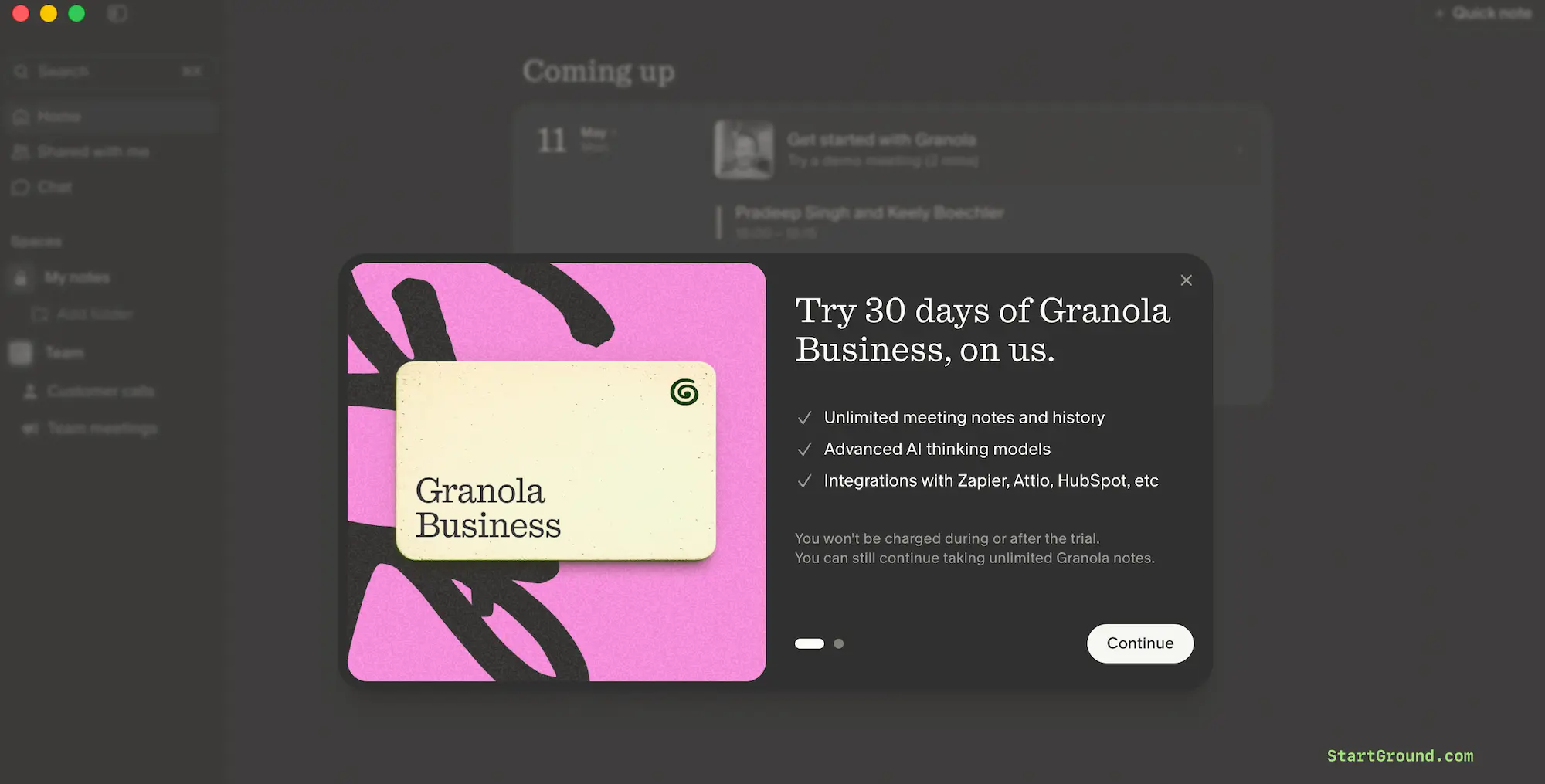
You will see the offer after you download and install the app. Open the app, and the offer will reveal automatically.
Step 4: Select an eligible paid plan: The deal applies to your first billing cycle automatically through the partner link. You can go to your Billing section within the app and add our Granola promo code ‘STARTGROUND’.
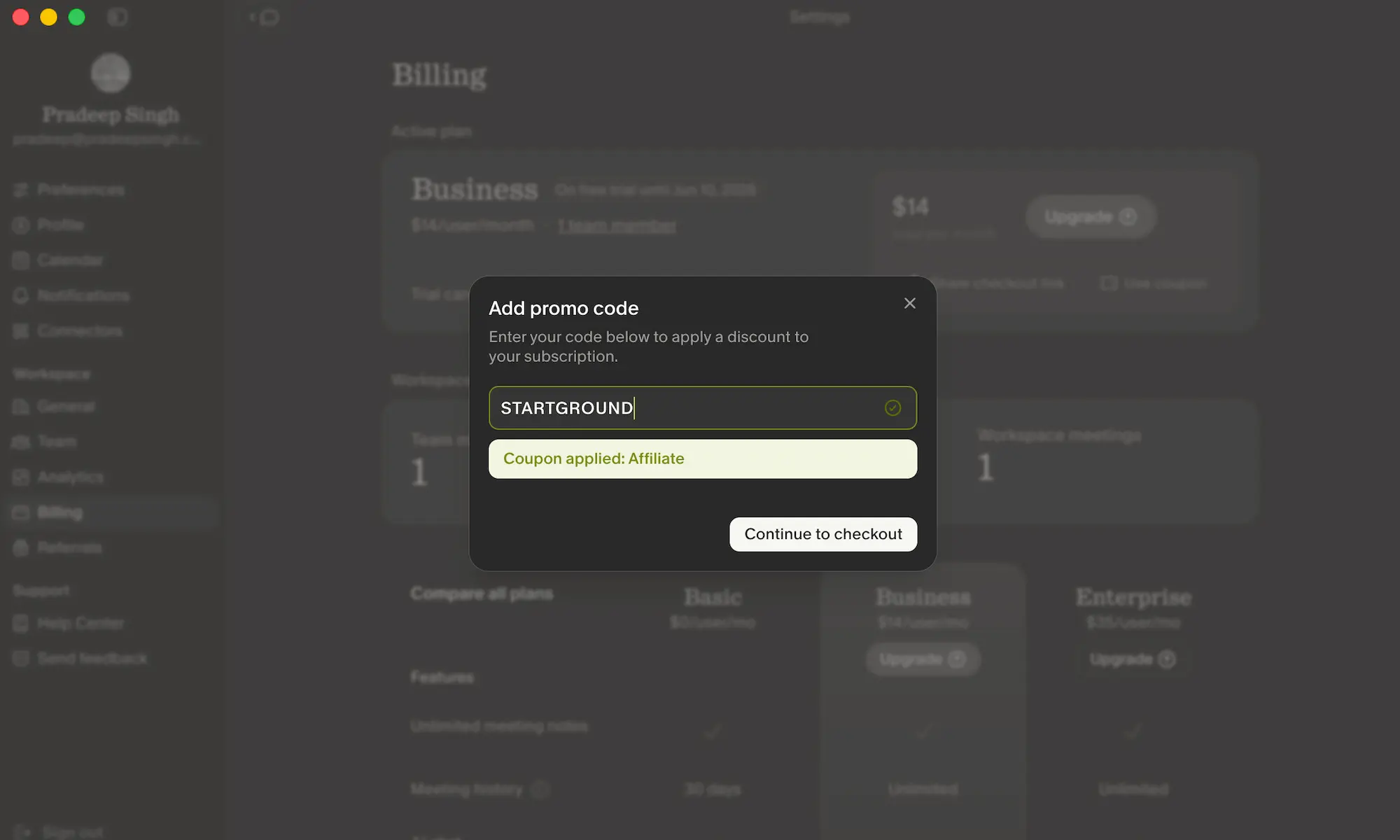
Step 5: Confirm the extended trial and start using Granola: Check that your account now shows roughly 60 days of free access before billing kicks in, then join your first meeting to test live transcription.
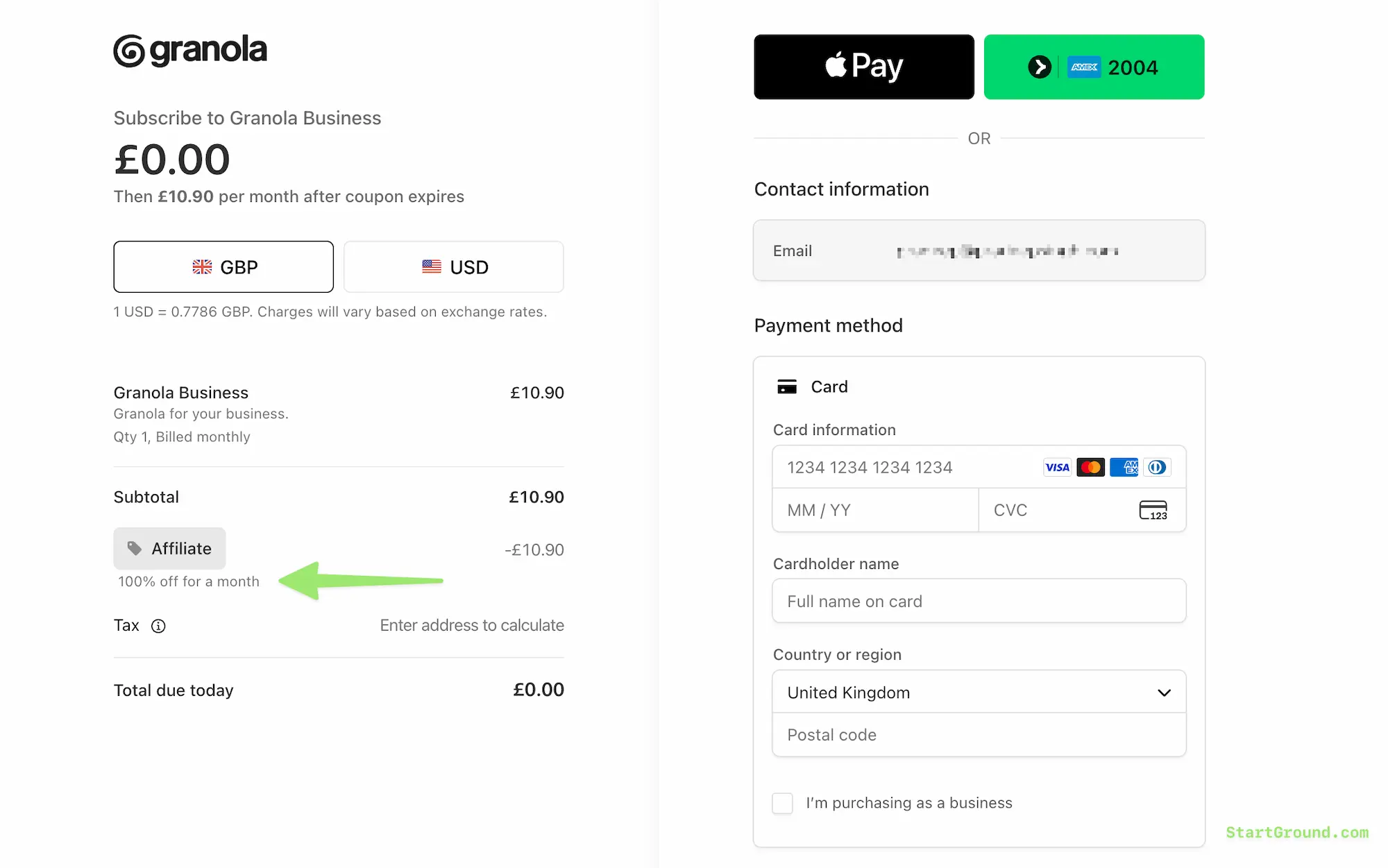
As you can see in the screenshot, our Granola promo code STARTGROUND gives you 100% OFF for an additional month. Enjoy an additional free month of Granola and decide if it’s worth using it for your needs.
Granola Pricing Plans and Discount
Granola keeps pricing straightforward with three tiers that scale from solo professionals to security-conscious enterprises. The StartGround partner deal applies to the first month of paid plans, so you get a low-risk way to test the features that the free plan caps.
The Basic plan is free forever and covers AI meeting notes with limited history. The Business plan unlocks unlimited history, advanced AI models, and integrations with the tools you already use. The Enterprise plan layers on SSO, admin controls, and priority support for larger organisations.
| Plan | Monthly Price (per user) | Best For | Key Features |
|---|---|---|---|
| Basic | Free | Solo users testing AI notes | AI meeting notes, limited history, AI chat, shared folders |
| Business | $14 | Founders, operators, small teams | Unlimited history, advanced AI thinking models, Notion, Slack, HubSpot, Attio, Affinity, Zapier integrations, centralised billing |
| Enterprise | From $35 | Security-conscious teams and larger companies | Everything in Business plus SSO, enterprise admin controls, priority support, usage analytics, meeting link sharing controls |
Your first-month savings depend on the plan you select and the number of seats you activate. The Business plan saves you a full month per seat, and the Enterprise tier saves you a larger amount per seat depending on the contracted rate.
Granola Overview and Features
Granola is an AI meeting notepad built for the part of your week that lives inside calls. Instead of routing a bot into every meeting, the app captures audio directly from your device, transcribes the conversation locally, and produces a structured summary the moment the call ends. You walk out of the meeting with notes, action items, and decisions already written.
The product targets a specific pain. If you spend four or five hours a day in meetings, manual note-taking eats your attention, and recorded calls pile up unwatched. Granola removes both problems. You stay present in the conversation, and the app does the documentation work in the background.
It blends typed input with AI-generated notes. You can scribble a quick reminder during the call, and Granola weaves your shorthand into the final summary, keeping your voice in the document rather than producing a sterile transcript dump.
Real-time transcription
Granola transcribes audio as the meeting happens, converting every speaker turn into accurate text. The transcription engine handles multiple accents and technical terminology well, so sales calls, product reviews, and customer research interviews all come out cleanly structured. You can glance at the live transcript during the call to catch something you missed, then trust the post-meeting summary to capture the rest.
Chat across your meetings
The contextual AI chat is where Granola starts to feel like a second brain. Ask “What did Sarah promise about timelines last Tuesday?” and the assistant pulls the exact moment from your meeting history. You can query across all your notes, not just one transcript, which makes it useful for tracking commitments across weeks of recurring discussions.
Automated summaries with action items
After every call, Granola produces a clean summary that captures decisions, key points, and follow-ups. The output is structured enough to share directly with your team without rewriting, which removes the awkward post-meeting tax of typing up notes while you remember what happened.
Searchable meeting archive
Every note and transcript gets indexed and made searchable. Type a keyword like “pricing discussion” or “Q3 forecast” and Granola surfaces every meeting where the topic came up, with the relevant quote highlighted. On the Business plan, this archive becomes unlimited, so you build a permanent searchable record of your meeting history rather than losing it to a 30-day cap.
Templates for recurring meetings
Customisable templates structure repeated meeting types — one-on-ones, sales discovery calls, customer interviews, sprint reviews. You build the template once, and every future meeting of that type follows the same scaffolding, which keeps your notes consistent across weeks and quarters.
Team collaboration and shared folders
Shared folders let teams pool their meeting notes around a project or account. If someone misses a call, they read the Granola summary instead of asking for a recap. Permissions let you control who sees which notes, which matters when sales calls and HR conversations live in the same workspace.
Deep integrations
The Business plan opens up integrations with Notion, Slack, HubSpot, Attio, Affinity, and Zapier, alongside Model Context Protocol support that lets your meeting context flow into the tools you already use. Action items can route into your task tracker, summaries can post to a Slack channel, and CRM-linked meetings can sync notes directly to the right deal record.
Cross-platform access
Granola runs on macOS, Windows, and iOS, with sync across devices. You can start a meeting on your laptop, review the summary on your phone, and ask follow-up questions from a tablet. The desktop app is the primary capture surface, while mobile becomes the natural read-and-review companion.
Privacy by design
Granola does not send a bot into your meetings. It captures audio locally on your device and gives you full control over what stays in your account and what gets deleted. Transcripts remain private to your workspace, and you decide what gets shared internally or pushed to external tools. For teams that handle sensitive customer conversations, this design matters.
All Granola Deals and Promotions
StartGround has partnered with Granola to bring you a single high-value offer aimed at new users on paid plans.
Offer 1: First month free on a paid Granola plan
New Granola users who sign up through the StartGround exclusive link unlock 100% off their first month on a paid plan. The deal applies automatically when you create your account and select either the Business or Enterprise tier at checkout. There is no manual code to enter — the partner link applies the offer for you, and the first-month discount appears on your billing summary before you confirm.
This deal is the right one to claim if you have outgrown the free Basic plan, want to access unlimited meeting history, or need integrations into Notion, Slack, HubSpot, or your CRM. It also makes sense if you are evaluating Granola for a team and want a real month of usage before you commit to a paid subscription.
Granola Deal FAQs
Granola Reviews
Granola has built a strong reputation among professionals who run meeting-heavy weeks — consultants, product managers, founders, sales reps, and customer success leads. The product holds a 4.9 average rating across early review platforms and partner directories, which is unusual for a category where transcription accuracy and AI summary quality often divide opinion.
What users praise most
The summaries get the most consistent praise. Users say Granola captures the substance of a meeting in a way that feels written rather than auto-generated, which means notes can be shared directly with a team or client without a rewrite pass. The blend of typed notes and AI output is the differentiator most reviewers call out.
The search and chat features come up next. Reviewers describe being able to ask “What did we agree on launch dates?” and getting the exact quote pulled from a meeting weeks earlier. That capability removes the slow, frustrating process of scrolling through transcripts to find one specific decision.
Where it performs well
UX researchers, sales teams, and small remote teams report the biggest workflow gains. Researchers cut their post-interview analysis time dramatically because themes get surfaced automatically. Sales reps lean on the CRM integrations to push notes into HubSpot or Attio without retyping anything. Remote team leads use shared folders to keep async colleagues aligned without scheduling extra catch-up calls.
Common feedback points
Transcription accuracy depends on audio quality, and that comes up in reviews. If multiple people talk over each other or someone joins from a noisy environment, the transcript can require light cleanup. Reviewers also note that integration coverage outside the core supported tools — Outlook calendar workflows and some Zoom-specific features — is still expanding.
A handful of users mention over-reliance on AI summaries as a personal habit to manage. The summaries are good enough that some people stop reviewing the full transcript, which occasionally means missing a subtle point the AI did not flag.
Overall sentiment
The overall reception is strongly positive. Granola is seen as one of the cleanest, least intrusive options in the AI meeting notes category, particularly for people who do not want a recording bot joining their calls. Users describe it as reliable, fast, and built for the way meeting-heavy professionals actually work.
Granola
Granola is an AI-powered meeting notepad that transcribes audio locally, generates structured summaries, and lets you chat with your meeting history across all past calls.
Price: 14
Price Currency: USD
Application Category: BusinessApplication
5
Pros
- Bot-free meeting capture protects privacy.
- AI summaries blend with typed notes seamlessly.
- Cross-meeting chat surfaces past decisions instantly.
Cons
- Accuracy drops with poor audio quality.
- Outlook and Zoom integrations still expanding.
- Free plan caps meeting history visibility.
Granola Alternatives
Granola is a strong pick for AI meeting notes, but the category has several capable competitors. Depending on your workflow, integrations, and preference for bot-based versus bot-free capture, one of the following may suit you better.
Otter.ai
Otter.ai is one of the most established players in the meeting transcription space, with strong integrations into Zoom, Google Meet, and Microsoft Teams. Unlike Granola, Otter sends a meeting bot into your calls, which can be useful if you need a participant-style transcript with named speaker labels. Otter leans more toward transcription depth, while Granola leans toward summary quality and ambient capture.
Fathom AI
Fathom AI is a strong free option for Zoom-heavy teams and offers an unlimited free tier on basic transcription. Compared to Granola, Fathom is more tightly coupled to Zoom and has fewer cross-platform capture options. Granola wins on local audio capture and the ability to work across any meeting tool without integration setup.
Fireflies.ai
Fireflies.ai targets sales and customer success teams with strong CRM integrations and conversation analytics. It uses a bot model rather than local capture, which makes it better suited for compliance-heavy environments where every call must be recorded and stored centrally. Granola is the cleaner choice if you want notes without a recording trail.
Fellow.app
Fellow is built around meeting agendas, action items, and one-on-one workflows rather than pure transcription. It works well for managers who want to structure recurring meetings and track follow-ups across teams. Granola handles transcription and summaries far more deeply, while Fellow handles agenda-driven meeting culture more deliberately.
Notta.ai
Notta.ai focuses on fast, accurate speech-to-text across multiple languages with strong support for translation. It is a good alternative if you regularly run meetings in non-English languages or need cross-language transcripts. Granola’s strength lies in the structured summary and chat layer rather than raw multilingual transcription.
Comparison table
| Tool | Capture Method | Best For | Starting Paid Price | Standout Strength |
|---|---|---|---|---|
| Granola | Local audio capture, no bot | Meeting-heavy professionals, founders, small teams | $14/user/month | AI summaries blended with typed notes, cross-meeting chat |
| Otter.ai | Meeting bot | Zoom/Meet/Teams users wanting deep transcripts | $8.33/user/month | Speaker-labeled transcripts and platform integrations |
| Fathom AI | Meeting bot | Zoom-first teams wanting free transcription | Free / paid premium | Strong free tier, Zoom-native workflows |
| Fireflies.ai | Meeting bot | Sales and CS teams with CRM workflows | $10/user/month | Conversation analytics and CRM-deep integrations |
| Fellow.app | Notes + light transcription | Manager-led teams running recurring meetings | $7/user/month | Agenda and action-item workflows |
| Notta.ai | Audio upload and live capture | Multilingual teams needing translation | $8.25/user/month | Multi-language transcription and translation |
Claim Your Granola Coupon Deal
If meeting notes are eating an hour of your day, the math on this offer is simple — a free month on Granola pays for itself in the time you stop spending on writeups and recap messages.
If you are a founder or operator drowning in sales calls, investor updates, and customer conversations, the partner link unlocks unlimited meeting history and the cross-meeting chat that turns those calls into a searchable archive.
If you lead a small team, the shared folders, integrations into Notion or Slack, and centralised billing on the Business plan keep everyone aligned without the constant async catch-up.
If you have been comparing Otter, Fathom, and Granola, the free month gives you a clean way to test Granola’s bot-free capture against a tool you already use, with no upfront commitment.
Claim your first month free through the StartGround partner link today and let Granola handle the notes from your next meeting onwards.
This offer is verified by StartGround in partnership with Granola. T&Cs apply. Offer valid for new Granola users signing up on a paid plan via the StartGround exclusive link.
RElated Categories:
Author: Pradeep Singh
Pradeep Singh is an entrepreneur and founder of StartGround, a platform dedicated to empowering startups and entrepreneurs with the best software deals and resources. With years of experience building and guiding startups to success, he’s passionate about helping entrepreneurs to access essential tools, best resources, and growth opportunities.