Copper CRM Deal (2026): 26% OFF + 14 Days Free Trial

Written By:
Pradeep Singh
Last Updated: August 5, 2026
Disclosure: This post may contain affiliate links, meaning if you decide to make a purchase via my links, I may earn a commission at no additional cost to you. See my disclosure for more info.
Claim the best Copper CRM deal with a 14-day free trial and up to 26% OFF on annual plans. Verified deal for new accounts.
| Copper CRM Deal | Details |
|---|---|
| Partner Deal | Direct link — the offer applies automatically |
| Offer / Discount | 14-day free trial and up to 26% OFF annual billing |
| Eligibility | New Copper accounts, any team size, worldwide |
| Free Trial | 14 days, no credit card, instant activation |
Copper launched in 2012 and now supports more than 30,000 companies across 100+ countries, backed by $102M in funding and a Recommended for Google Workspace badge that very few CRMs hold. Agencies, consultancies, production studios, and financial advisers gravitate toward it for one reason: your team already spends the day in Gmail, so the CRM works where they already are.
Steps to Claim Copper Deal
Claiming takes a couple of minutes and you can start on the free trial before you pay anything.
Step 1: Click the StartGround partner link: Following the partner link takes you to Copper’s pricing with the discount already reflected on the page.
Step 2: Sign up with your Google account: Use the Sign up with Google button so Copper connects to your Workspace inbox, calendar, and Drive from the first minute.
Step 3: Pick your plan and activate: Choose Basic, Professional, or Business, switch billing to annual for the deepest saving, and your partner discount applies at checkout.
Copper Pricing Plans and Discount
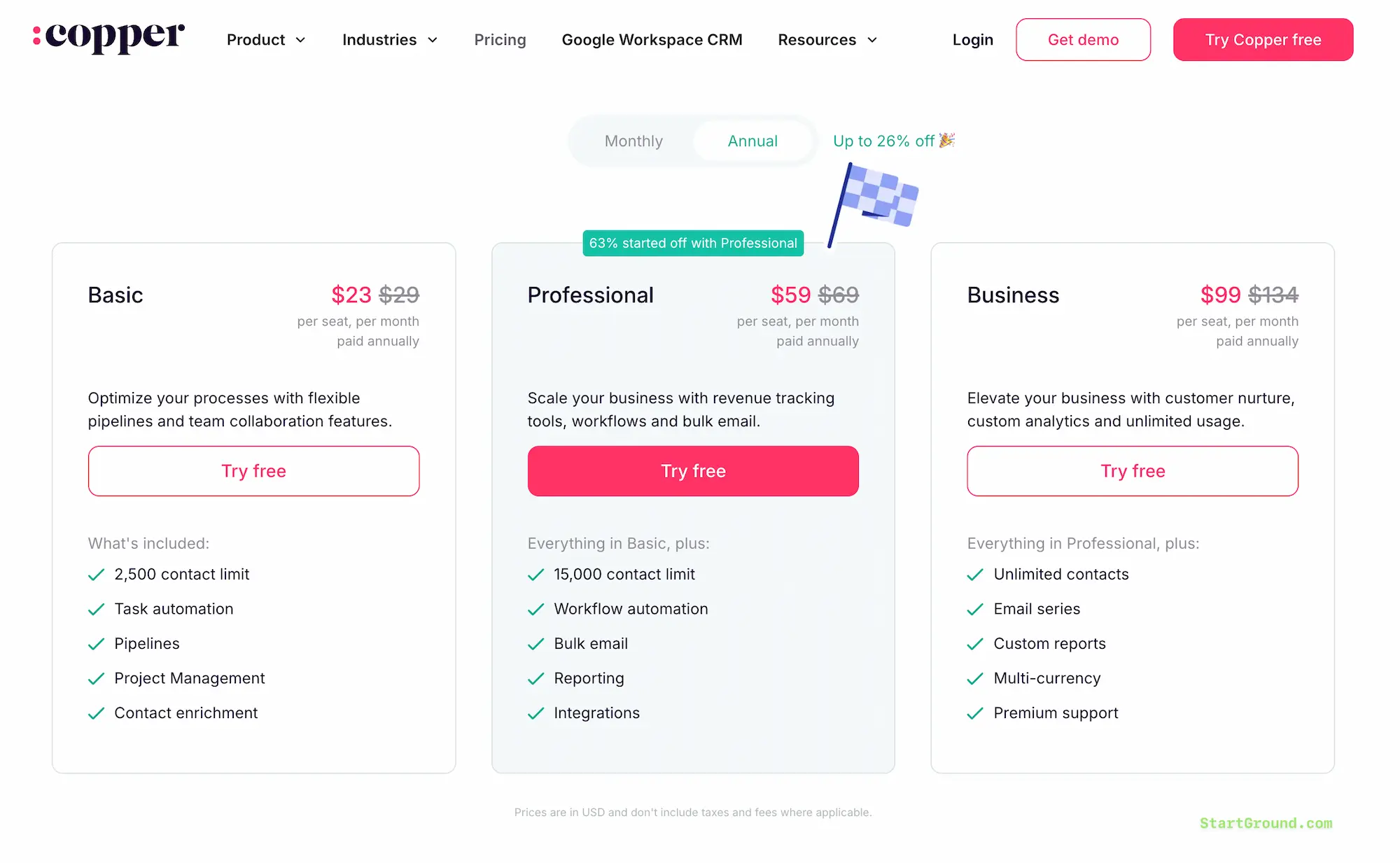
Copper runs three plans, all priced per seat. Annual billing cuts the monthly rate by up to 26%, and your StartGround partner discount stacks on top of the standard pricing when you sign up through the exclusive link.
| Plan | Annual (per seat/month) | Monthly (per seat/month) | Contact Limit | Custom Fields | Standout Inclusions |
|---|---|---|---|---|---|
| Basic | $23 | $29 | 2,500 | 25 | Pipelines, project management, task automation, contact enrichment |
| Professional | $59 | $69 | 15,000 | 50 | Workflow automation, bulk email, reporting, full integrations library |
| Business | $99 | $134 | Unlimited | Unlimited | Email series, custom reports, multi-currency, SSO, premium support |
Basic suits a solo consultant or a two-person studio that wants pipelines and a clean contact record without paying for automation depth. You still get the Chrome extension, the Gmail sync, and project pipelines at this tier, which is more than most entry plans hand over.
Professional is where the majority of teams land — Copper reports that 63% of customers start there. The jump buys you workflow automation, bulk email from your own Gmail address, and the reporting suite, which together remove most of the manual admin that makes CRMs feel like a chore.
Business earns its price when contact volume climbs or when you sell across currencies. Unlimited records, custom report building, automated email series, Okta single sign-on, and premium support turn it into the tier for agencies running several account teams at once.
Every plan starts with a 14-day free trial. No credit card, instant activation, and you can invite the rest of your team later.
Copper Overview and Features
Copper is a relationship-first CRM built for businesses where revenue comes from people rather than volume — agencies, consultancies, media companies, production studios, construction firms, and advisory practices. Instead of asking your team to learn a separate system, it layers onto Google Workspace and pulls email, meetings, and files into customer records on its own.
The Google relationship runs deeper than a plugin. Copper holds Recommended for Google Workspace status, sits in the Chrome Enterprise partner programme, and counts Google among its backers. Setup reflects that: connect your Workspace account and Copper immediately populates contacts and conversation history rather than starting you on an empty database.
Adoption is the quiet argument here. A CRM only works if the team actually updates it, and Copper’s own customers routinely describe going live in days rather than the multi-month rollouts that enterprise platforms demand.
Built inside Google Workspace
The Chrome extension puts Copper in the right-hand panel of Gmail. Hover a sender and you see their full history — past deals, open tasks, linked files, recent notes — without opening a new tab. Add a new contact or opportunity from the same panel while the email thread is still in front of you.
Google Calendar gets the same treatment. Open an event and Copper surfaces the client record, previous meeting notes, and any documents attached to the account, so you walk into calls prepared instead of scrambling through search. Gemini can record and transcribe the meeting, then push the transcript onto the Copper record in one click.
Drive files sync automatically once you send them. Proposals, contracts, and decks attach themselves to the right company and deal, and Copper suggests relevant files when you compose a reply in Gmail.
Contact management and enrichment
Manual data entry kills CRM adoption faster than anything else. Copper enriches new records on its own, filling in phone numbers, secondary email addresses, company details, and social profiles from public sources.
It also watches your inbox for people who should be in the system and suggests them as contacts. A business card scanner in the mobile app handles conference leads — photograph the card and a record appears.
The LinkedIn Chrome extension closes the last gap. Research a prospect on their profile, add them to Copper, and drop them straight into a lead generation pipeline without leaving the page.
Visual sales pipelines
Pipelines use drag-and-drop stages you define yourself, with deal value, owner, expected close date, and any custom fields you need on each card. Sort by value or win probability to see where the real money sits.
AI flags do the nagging for you. Copper surfaces deals that have gone quiet, spots bottlenecks where opportunities pile up in one stage, and highlights the high-value records that deserve attention this week. Pipeline templates give you a starting structure if you would rather not design one from scratch.
Projects after the close
Most CRMs stop at the signature. Copper carries the relationship forward — mark an opportunity won and it converts into a project pipeline for delivery, onboarding, or partnership management.
That single move eliminates the handoff document. Your sales notes, the client’s emails, the signed contract, and the delivery checklist all sit on the same record, so the producer or account manager picking up the work starts with full context.
Tasks and subtasks break projects into assignable pieces with due dates visible on each card. Kanban boards and list views are both available, and you can control which fields appear on a card so the board shows what your team actually needs.
Email and automation
Copper sends from your own Gmail address, which keeps deliverability and replies where they belong. Templates with merge fields speed up repetitive sends, and an AI writing assistant drafts a message or rewrites your draft for tone, length, or clarity.
Automations handle the follow-up discipline that busy teams drop first. Trigger a welcome email when someone submits your contact form, queue a task when a deal reaches the proposal stage, send a kickoff message when a project starts, or fire a check-in after delivery wraps.
Rekindle emails deserve their own mention. Copper watches for contacts who have gone silent past a threshold you set and sends a friendly nudge automatically, which is how dormant accounts turn back into pipeline.
Open tracking and click tracking show you which messages land, and contact forms on your website feed leads straight into a pipeline with a personalised reply already on its way.
Reporting and forecasting
The reporting suite covers sales history, forecasting by expected close date, goal tracking against target, win rates by individual or team, lead conversion quality, and loss reason analysis. Templates give you one-click dashboards for the standard questions.
Custom dashboards let you rearrange charts, apply filters, and define your own KPIs. Schedule any report for recurring email delivery so your Monday numbers arrive without anyone building them.
Copper also does the maths. Automations calculate commissions, agency profit, and margin, then feed those figures into reports. Export anything to Google Sheets through the custom report builder, or pipe it into Looker Studio to sit alongside your other data sources.
Mobile and on-the-go logging
The iOS and Android apps log calls and SMS automatically, so field teams and travelling consultants keep records current without opening a laptop. Construction firms and production companies lean on this heavily — the person on site updates the job while standing on it.
Integrations that fill the gaps
Native integrations cover Slack, QuickBooks, DocuSign, PandaDoc, Mailchimp, JustCall, RingCentral, Zendesk, and Surfe for LinkedIn outreach. Mailchimp runs a two-way sync, so a lead added in either tool appears in both.
Zapier connects Copper to more than 5,000 additional apps, and an API plus an embedded integration SDK covers anything bespoke. Specialist tools also plug in — Parallax for agency resource planning, Coda for internal docs, Timmy.io for production scheduling.
All Copper Deals and Promotions
Three offers run through the StartGround partner link right now. Pick whichever matches where your business sits today.
Offer 1: 14-day free trial with instant activation
Copper opens with a full 14-day trial that requires no credit card. Activation is instant, so you can connect Workspace, import contacts, and run a live pipeline before you decide anything. Trial accounts get the real product rather than a stripped-back demo, which means you can test automations and reporting properly.
Offer 2: Up to 26% off with annual billing
Switching from monthly to annual billing cuts the per-seat rate by as much as 26%. Basic drops from $29 to $23, Professional from $69 to $59, and Business from $134 to $99 per seat per month. Combine annual billing with the partner link for the lowest total cost available.
| Offer | What You Get | Best For |
|---|---|---|
| Free trial | 14 days, full features, no card | Teams comparing CRMs |
| Annual billing | Up to 26% off list pricing | Committed buyers ready to lock in |
Copper Deal FAQs
Copper Reviews
Copper carries a strong reputation among small and mid-sized service businesses, with over 30,000 companies using it and recurring leader placements on G2, including a G2 Leader award for Spring 2026. Reviewers cluster around the same theme: this is the CRM their team actually opens.
Setup speed wins people over
The single loudest piece of feedback concerns onboarding. Teams migrating from enterprise platforms describe timelines measured in days against the months their previous rollout consumed — one design studio switched from HubSpot and had the whole team working in Copper inside three days.
Connecting Google Workspace does most of the work. Contact history arrives pre-populated, which spares you the empty-database problem that stalls so many CRM launches.
The Gmail panel keeps records current
Reviewers consistently single out the Chrome extension as the feature that changed their habits. Logging activity where the activity happens removes the end-of-day catch-up ritual, and record quality improves as a result.
Account managers running several client relationships mention the activity feed alongside it — nobody has to interrupt a colleague to ask what happened on a call they missed.
Where the criticism lands
Copper is not the cheapest CRM at entry level, and teams comparing it against free tiers feel that. The 2,500-contact ceiling on Basic also frustrates users who build large marketing lists, pushing them toward Professional sooner than they planned.
Some reviewers want deeper native marketing automation and find themselves reaching for Mailchimp or Zapier to cover campaign work. Reporting on the lower plans stays fairly basic, so custom analytics means Business.
Teams outside Google Workspace get noticeably less value, and reviews reflect that mismatch honestly.
Overall sentiment
The consensus is clear enough: pick Copper when your business runs on relationships and your team runs on Gmail. Firms wanting a heavyweight sales machine with deep marketing automation find better fits elsewhere, and Copper does not pretend otherwise.
Copper CRM
Copper is a Google Workspace CRM that helps relationship-driven businesses manage contacts, sales pipelines, projects, and client communication directly inside Gmail, Calendar, and Drive.
Price: 23
Price Currency: USD
Application Category: BusinessApplication
5
Pros
- Deepest Gmail and Google Workspace integration available.
- Projects and delivery continue after the deal closes.
- Setup takes days, not months.
Cons
- Entry pricing sits above budget CRMs.
- Basic plan caps contacts at 2,500.
- Limited value without Google Workspace.
Copper Alternatives
Copper suits relationship-driven service businesses beautifully, though a different shape of company sometimes calls for a different tool. Compare these before you commit.
Pipedrive
Pipedrive is the sharpest pure sales CRM in this group, with pipeline visualisation and activity-based selling as its core discipline. Unlike Copper, it treats post-sale delivery as an add-on rather than a first-class workflow, so agencies running projects after the close lose the continuity Copper provides.

Zoho CRM
Zoho undercuts almost everyone on price and connects to a vast suite of business apps, making it attractive for cost-conscious teams that want everything under one vendor. Configuration takes real effort though, and the Gmail experience never approaches what Copper delivers natively.

HubSpot CRM
HubSpot leads with a genuinely free tier and the broadest marketing automation stack on the market, covering landing pages, ad management, and full campaign attribution that Copper leaves to integrations. The trade-off shows up at scale, where HubSpot’s paid tiers climb steeply and setup takes considerably longer than Copper’s few days.

Streak
Streak lives entirely inside Gmail as a browser extension and starts free, which appeals to solo operators and tiny teams. It stays lighter than Copper across projects, reporting, and automation, and it lacks the Calendar and Drive depth that makes Copper feel like part of Workspace rather than an add-on.
Insightly
Insightly pairs CRM with project management much as Copper does, and appeals to teams wanting more granular project controls. Copper answers with a smoother Google integration and faster adoption, while Insightly asks for more admin time to get running.
Claim Your Copper Deal
A CRM your team ignores costs more than one you pay for, and Copper’s whole design solves that problem by living where your team already works. The StartGround partner discount simply makes the decision cheaper.
If you run an agency or studio: move deals into delivery pipelines the moment they close and stop rebuilding context in handoff documents.
If you consult solo or with a small team: start on Basic through the partner link, keep every client conversation on one record, and upgrade when the contact list outgrows it.
If you are switching from a heavier platform: connect Workspace, let Copper import your history, and expect to be working properly within the trial period.
Follow the StartGround exclusive link, take the 14 days for free, and lock in your partner rate when you are ready.
RElated Categories:
Author: Pradeep Singh
Pradeep Singh is an entrepreneur and founder of StartGround, a platform dedicated to empowering startups and entrepreneurs with the best software deals and resources. With years of experience building and guiding startups to success, he’s passionate about helping entrepreneurs to access essential tools, best resources, and growth opportunities.