Switcher Studio Promo Code (2026): Claim 15% OFF Plans Deal

Written By:
Pradeep Singh
Last Updated: June 25, 2026
Disclosure: This post may contain affiliate links, meaning if you decide to make a purchase via my links, I may earn a commission at no additional cost to you. See my disclosure for more info.
Switcher Studio turns the phones, tablets, and Macs you already own into a multicamera broadcast studio. With our exclusive Switcher Studio deal, you can claim 15% OFF any plan when you apply the code STARTGROUND alongside our exclusive partner link. This deal suits creators, churches, sports teams, and marketing crews who want professional live video without buying a rack of broadcast gear.
| Switcher Studio StartGround Deal | Details |
|---|---|
| Partner Promo Code | STARTGROUND |
| Offer / Discount | 15% OFF Switcher Studio plans |
| Eligibility | New Switcher Studio subscribers |
| Redemption Method | Apply code STARTGROUND with the StartGround partner link |
| Free Trial | 14 days, cancel anytime |
This is a verified StartGround partner offer.
More than 14,000 teams and creators run their streams on Switcher Studio, syncing up to nine camera angles, mixing layouts in real time, and pushing live video to every major platform at once. The discount applies on top of the standard 14-day free trial, so you can test the full workflow before a single charge lands.
Steps to Claim Switcher Studio Deal
Claiming your discount takes only a few minutes, and the steps below walk you through it from start to finish.
Step 1: Visit our exclusive partner link: Use our exclusive partner link to visit the Switcher Studio site with your offer ready to go.
Step 2: Apply the promo code STARTGROUND: Enter STARTGROUND at checkout so the 15% discount attaches to your chosen plan.
Step 3: Start your trial and subscribe: Download the app on your Mac or iOS device, begin your 14-day free trial, and confirm your plan to lock in the saving.
Switcher Studio Pricing Plans and Discount
Switcher Studio keeps its pricing simple with two plans, and your StartGround code works across both. The split comes down to how much you plan to grow your streaming operation and whether you want to host and monetize video directly.
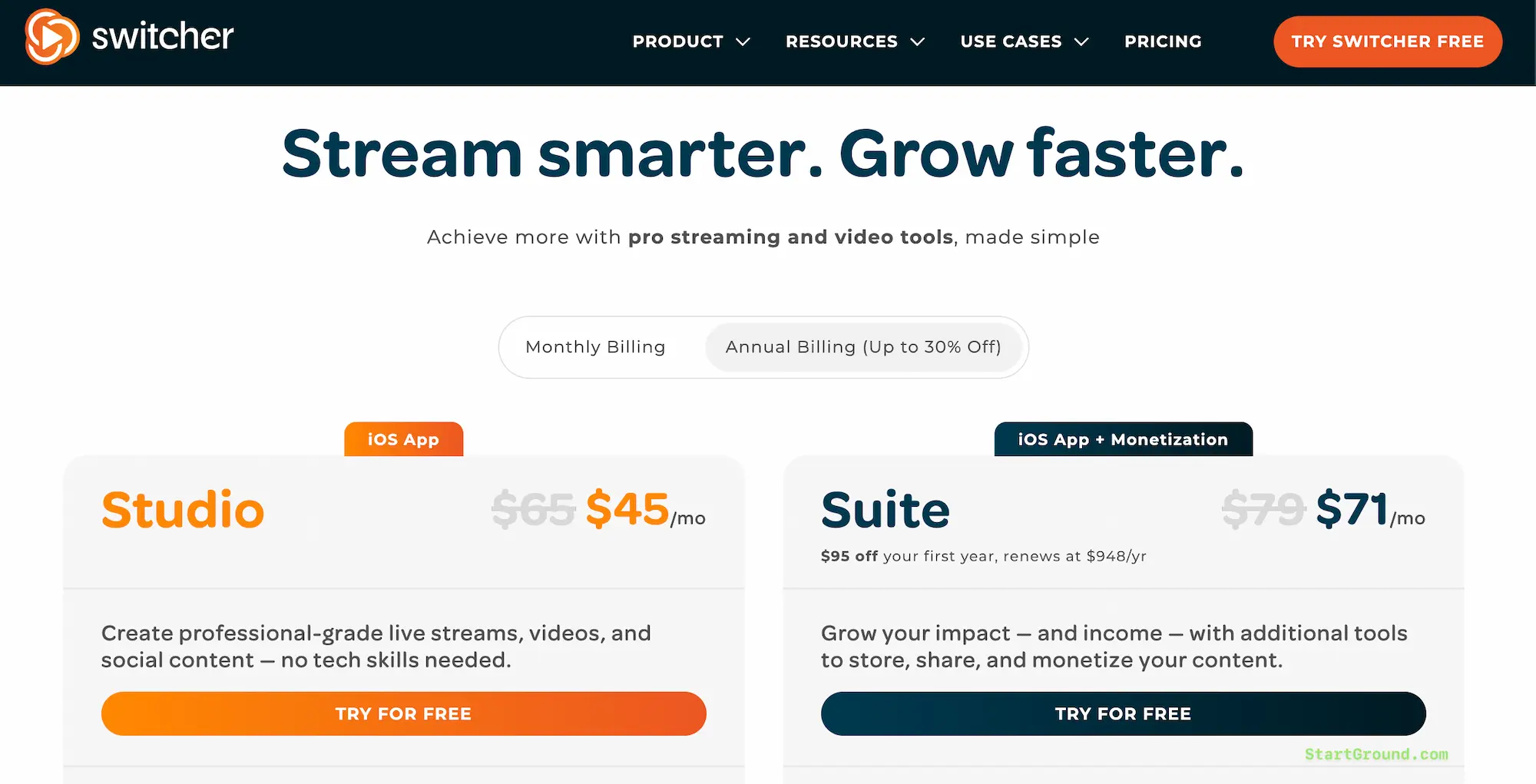
The Studio plan covers the core production toolkit: multicamera filming, real-time editing, branded graphics, social clips, and donations. The Suite plan layers monetization and hosting on top, opening up paid tickets, pay-to-view content, subscriptions, video hosting, and embeddable players. Both bill monthly or annually, and choosing annual billing already trims the per-month rate before your StartGround discount even applies.
| Plan | Monthly Billing | Annual Billing (per month) | Best For |
|---|---|---|---|
| Studio | $65/mo | $45/mo | Solo creators and small teams focused on streaming and social video |
| Suite | $99/mo | $71/mo | Organizations that want to host, embed, and monetize their content |
Your 15% discount with code STARTGROUND stacks on whichever billing cycle you pick, so an annual Suite subscription delivers the deepest combined saving. Annual billing locks the lower base rate, and the StartGround code reduces it further from there.
Switcher Studio Overview and Features
Switcher Studio is a mobile-first live video production platform built around Apple hardware. Instead of asking you to invest thousands in switchers, capture cards, and dedicated cameras, it transforms iPhones, iPads, and Macs into a synchronized multicam rig you control from a single interface. That positioning has made it a favorite among houses of worship, sports programs, educators, and independent creators who need broadcast polish on a realistic budget.
The platform earns its keep through breadth. You get camera switching, live editing, branding, audience engagement, recording, and monetization in one subscription, replacing a stack of separate tools that would otherwise each carry their own fee.
Multicamera capture
You can sync up to nine cameras at once, pulling in iPhones, iPads, Androids, NDI sources, and HDMI inputs. Switching between angles happens live, with a tap, so a one-person operator can run coverage that used to demand a full crew. Wireless and wired capture both work, which matters when you mix fixed cameras with roaming handhelds at an event.
Real-time editing and layouts
Picture-in-picture, split-screen, multiview layouts, and screen sharing all run from the same dashboard during a live broadcast. You compose the shot as the action unfolds rather than fixing it in post, which is exactly why “run and gun” crews gravitate toward it.
Multistreaming and RTMP
Switcher pushes your broadcast to Facebook, YouTube, Instagram, TikTok, X, LinkedIn, and more simultaneously. The Studio plan covers two destinations at once, while Suite expands that to twenty. Custom RTMP connections let you reach any platform beyond the built-in integrations, so you are never boxed in by the preset list.
Branding and graphics
You can apply your colors, fonts, and logos across every stream, then save the setup as a reusable brand profile. Customizable graphic templates handle lower-thirds, text overlays, scoreboards, and images in seconds. Build your look once and every future broadcast inherits it automatically.
Audience engagement
Comments from Facebook and YouTube land in a single unified view, so you can react to your community without juggling tabs. Remote guests join through picture-in-picture with screen sharing, which turns a solo stream into a proper interview show. Live polling keeps viewers participating rather than passively watching.
Recording and content repurposing
Every stream can save automatically through recording-only mode, local recordings, and cloud recordings. The built-in social media clip creator then carves your broadcast into ready-to-post segments, so a single live session feeds your entire content calendar for the week.
Hosting and monetization
On the Suite plan, Switcher becomes a home for your video as well as a tool to produce it. You can embed streams and videos on your own site, build a branded watch page, and run an ad-free, distraction-free library with no competitor recommendations stealing attention. Monetization tools cover ticketed live events, pay-to-view videos, subscriptions, and donations through PayPal, Givelify, or Tithe.ly. Switcher takes no percentage of sales and charges a flat fee per transaction, which keeps more revenue in your hands compared with platforms that skim a cut off the top.
All Switcher Studio Deals and Promotions
StartGround currently lists one headline Switcher Studio offer, and it applies across the entire plan lineup.
Offer 1: 15% OFF any Switcher Studio plan
Apply the code STARTGROUND with the StartGround partner link to take 15% off your Switcher Studio subscription. The discount works on both the Studio and Suite plans, and on monthly or annual billing, giving you flexibility to match the saving to whichever setup fits your workflow. New subscribers also keep the standard 14-day free trial, so you can run a full production cycle before committing.
| Deal | Discount | Applies To | Code |
|---|---|---|---|
| StartGround Exclusive | 15% OFF | All plans, monthly or annual | STARTGROUND |
Switcher Studio Deal FAQs
Switcher Studio Reviews
Switcher Studio holds a strong reputation across review platforms, with users consistently praising how much production value it squeezes out of consumer hardware. The platform shows up most often in the worship, sports, education, and creator communities, where small teams need broadcast quality without broadcast budgets.
What users praise most
The recurring theme is value for money. Reviewers describe turning everyday iPhones and iPads into a professional setup that would otherwise cost thousands in dedicated equipment. One long-time user noted using the app for a full decade and still ranking it as their top pick for recording and streaming. The multicamera setup, often described as ready in minutes, draws particular admiration.
Where it performs well
Production quality and social integration come up again and again. Users report dramatic jumps in viewership after switching to Switcher, with one crediting a near tenfold increase in views for their weekly Facebook Lives. The high-quality graphics built into the app, combined with the ability to integrate outputs from iPhones, iMacs, and remote contributors, make it a genuine all-in-one studio rather than a single-trick tool.
Common points of feedback
The price can feel steep at first glance, and several reviewers acknowledge that initial reaction before concluding the feature set justifies the cost. A handful of users also wish for native webcam input on PC, which Switcher does not currently support given its Apple-centric design. These are minor friction points rather than dealbreakers, and most reviewers frame them as room to grow rather than reasons to leave.
Overall sentiment
Sentiment skews highly positive. The platform earns loyalty from users who stick with it for years, and the most common verdict is that the output quality and time savings outweigh the subscription cost, especially once a brand profile and workflow are dialed in.
Switcher Studio
Switcher Studio is a mobile multicamera live streaming platform for Mac and iOS that lets you produce, edit, brand, and monetize professional live video using the devices you already own.
Price: 45
Price Currency: USD
Application Category: MultimediaApplication
4.5
Pros
- Turns iPhones and iPads into a studio.
- Up to nine synced camera angles.
- Built-in monetization with low fees.
Cons
- Subscription feels pricey upfront.
- Apple devices required to run.
- No native PC webcam input.
Switcher Studio Alternatives
Switcher Studio leads the pack for mobile multicamera production, but the right tool depends on your platform, team size, and how much technical control you want. Here is how the main competitors stack up.
Ecamm Live
Ecamm Live is a Mac-only desktop studio that rivals Switcher on overlays, NDI, screen sharing, and isolated recordings. Choose Ecamm when your production lives on a Mac and you want deep desktop control. Switcher counters with true mobile capture across iPhones and iPads, which Ecamm cannot match for run-and-gun fieldwork.
StreamYard
StreamYard runs entirely in the browser, making it the easiest option for guest-heavy talk shows and webinars with no app to install. Choose StreamYard when simplicity and remote guests top your list. Unlike StreamYard, Switcher gives you genuine multicamera switching and HDMI input for layered, in-person productions.
Restream
Restream is built around cloud multistreaming, sending one feed out to a long list of destinations without taxing your computer. Choose Restream when broadcasting to many platforms at once is your single biggest priority. Switcher bundles multistreaming into a full production and editing suite rather than treating it as the headline feature.
OBS Studio
OBS Studio is free, open-source, and endlessly customizable, but it carries a steep learning curve and no built-in multistreaming without plugins. Choose OBS when budget is zero and you enjoy technical tinkering. Switcher trades that flexibility for a polished, tap-to-switch interface that gets you live in minutes.
vMix
vMix is a Windows-only powerhouse aimed at large hybrid events and replay-heavy sports, but it expects serious hardware like capture cards and fast storage. Choose vMix for high-end studio installations. Switcher delivers comparable multicamera coverage from a tablet, with none of the hardware overhead.
Claim Your Switcher Studio Deal
Pro-grade live video used to mean a crew, a console, and a five-figure equipment list. Switcher Studio collapses all of that into the Apple devices already in your bag, and the StartGround code makes the jump even easier on your budget.
If you are a creator building a show or growing a following, the Studio plan with code STARTGROUND gets you multicam production and social clips at a reduced rate.
If you run a church, sports program, or business that wants to host and monetize content, the Suite plan unlocks ticketing, subscriptions, and embeddable video for your own site.
Apply the code STARTGROUND through our partner link, start your 14-day trial, and broadcast your next event like the pros today.
This offer is verified by StartGround in partnership with Switcher Studio. T&Cs apply. Discount requires use of the StartGround partner link and promo code at checkout.
RElated Categories:
Author: Pradeep Singh
Pradeep Singh is an entrepreneur and founder of StartGround, a platform dedicated to empowering startups and entrepreneurs with the best software deals and resources. With years of experience building and guiding startups to success, he’s passionate about helping entrepreneurs to access essential tools, best resources, and growth opportunities.