
Brosix Promo Code (2026): Save 20% on Premium Plan Deal

Written By:
Pradeep Singh
Last Updated: May 18, 2026
Disclosure: This post may contain affiliate links, meaning if you decide to make a purchase via my links, I may earn a commission at no additional cost to you. See my disclosure for more info.
If you run a team and need a secure, distraction-free messaging platform, the Brosix deal for our StartGround users gives you a head start. Use the exclusive Brosix promo code STARTGROUND to save 20% on the Premium plan — a verified partner offer available right now through our deal page.
| Brosix StartGround Deal | Details |
|---|---|
| Partner Promo Code | STARTGROUND |
| Offer / Discount | 20% off the Brosix Premium plan |
| Eligibility | New and existing Brosix customers |
| Redemption Method | Apply the promo code at checkout via the partner link |
Brosix is a private team messaging platform with over 20 years in the market, trusted by organisations across 80+ countries in sectors ranging from healthcare and insurance to financial services and education. The platform delivers encrypted instant messaging, voice and video calls, screen sharing, and granular admin controls inside a dedicated private network that only your team can access.
Steps to Claim Brosix Deal
Getting the Brosix discount through StartGround takes just a few steps. Follow the process below to activate your savings.
Step 1: Click the partner link: Use our exclusive partner link to visit the Brosix website with pricing plans.
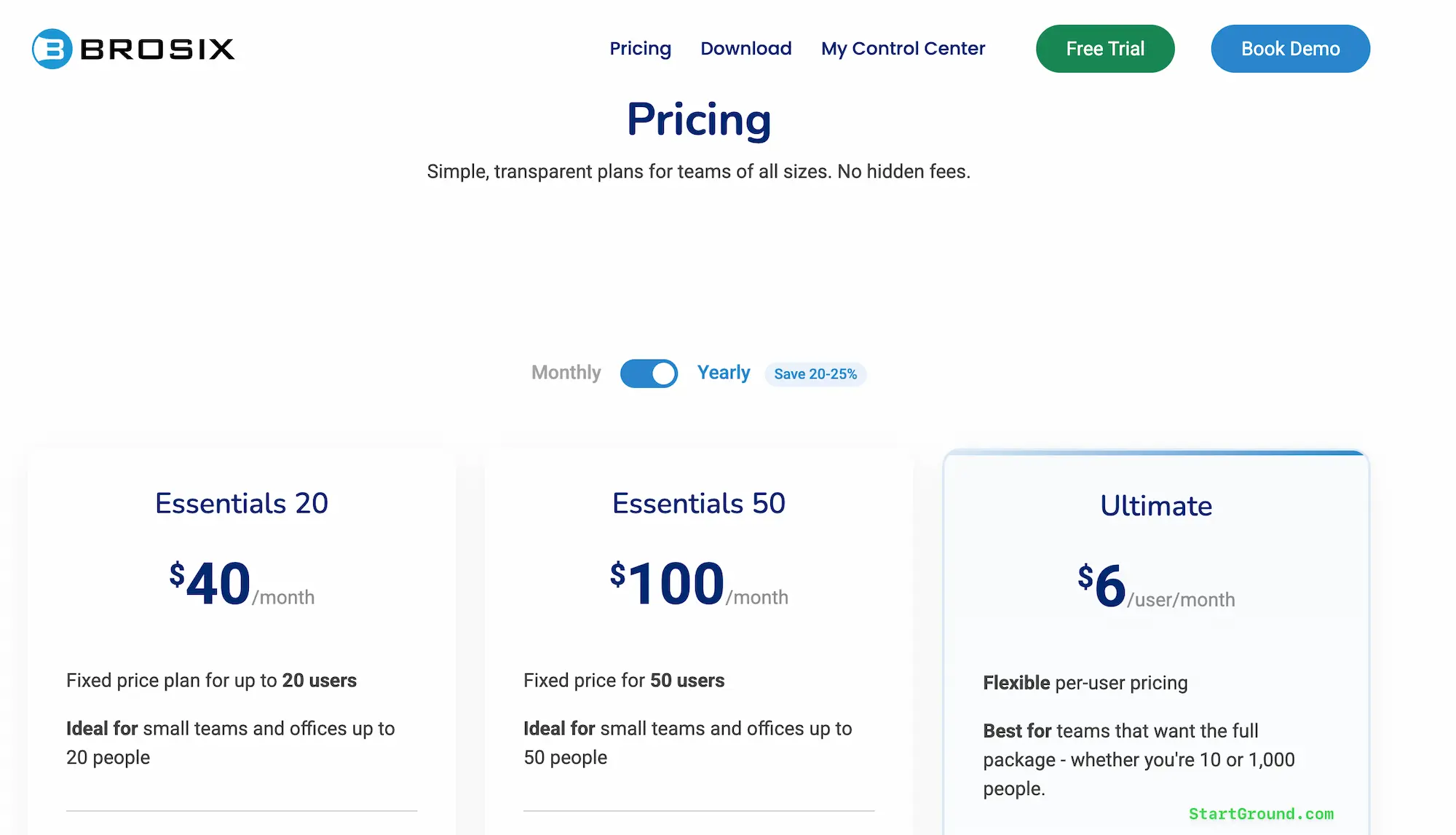
Step 2: Choose your plan: Select the Brosix Premium plan that fits your team size and billing preference — monthly or annual.
Step 3: Apply the promo code: Enter the code STARTGROUND at checkout to apply the 20% discount to your plan.
Step 4: Complete your purchase: Finalise your account setup, invite your team members, and start messaging securely within minutes.
Brosix Pricing Plans and Discount
Brosix keeps its pricing structure refreshingly simple. There are no hidden tiers, no feature walls buried behind enterprise sales calls, and no per-message limits. Every plan includes the full set of communication tools — the differences come down to team size, admin capabilities, and branding options.
Here is how the current Brosix pricing breaks down:
| Plan | Monthly Price | Annual Price | Team Size | Best For |
|---|---|---|---|---|
| Essentials 20 | $50/month | $40/month | Up to 20 users | Small offices and startups |
| Essentials 50 | $125/month | $100/month | Up to 50 users | Growing teams with fixed budgets |
| Ultimate | $8/user/month | $6/user/month | Unlimited users | Teams needing full controls and branding |
The Essentials plans use flat-rate pricing, which makes budgeting predictable for smaller organisations. You pay a single monthly or annual fee regardless of whether you have 5 users or 20. The Essentials 50 plan extends that same model for teams up to 50 people.
The Ultimate plan shifts to per-user pricing and unlocks everything Brosix offers — multiple administrators, custom logo branding, advanced user permissions, broadcast messaging, chat history synchronisation, IP address restrictions, and integrations with external tools through the Notifications API and Active Directory. Annual billing on the Ultimate plan brings the cost down to $6 per user per month, and with the StartGround promo code applied on top, you drive that cost even lower.
For teams evaluating whether Brosix fits their budget, the flat-rate Essentials plans are hard to beat. A 20-person team on the Essentials 20 annual plan pays just $2 per user per month — significantly cheaper than Slack, Microsoft Teams, or most alternatives in the team messaging category.
Every plan also includes a 14-day free trial with no credit card required, so you can test the full feature set before committing.
Brosix Overview and Features
Brosix positions itself in a space that sits between the casual simplicity of WhatsApp and the enterprise complexity of Slack or Microsoft Teams. The platform gives your team a dedicated, private messaging network — not a shared public workspace where outsiders can stumble in through links or invitations. Your Brosix network belongs exclusively to your organisation, and you control every aspect of who joins, what they can access, and how long conversations are stored.
The company has been operating for over two decades, which is rare in the SaaS messaging world, where tools launch and disappear every few years. That longevity translates into a platform that works reliably without constant maintenance or IT oversight.
Brosix runs on Windows, macOS, Linux, iOS, Android, and the web, so your team stays connected regardless of their device.
Setting up a Brosix network takes about 60 seconds. That is not marketing exaggeration — you name your network, create your admin account, and you are ready to invite teammates by email or join link.
Private team network
Every Brosix account runs on its own isolated network. This is fundamentally different from Slack or Teams, where workspaces exist on shared infrastructure. Your Brosix network is private by default — only people you explicitly invite can access it.
There are no public channels that strangers can browse, no guest accounts that blur the boundary between internal and external communication. For organisations in regulated industries like healthcare, insurance, or financial services, this architecture is a significant compliance advantage.
Encrypted messaging and calls
All communication on Brosix — text messages, voice calls, video calls, and file transfers — runs through encrypted channels. The platform uses peer-to-peer encryption for direct communications, meaning your data travels between devices without sitting on intermediate servers.
Brosix supports HIPAA, FINRA, GDPR, and NIS2 compliance requirements, which is why you see strong adoption among medical practices, insurance agencies, and financial firms.
Screen sharing and remote desktop
Brosix includes built-in screen sharing and remote desktop access across all plans. You do not need a separate tool like Zoom or TeamViewer to walk a colleague through a process or troubleshoot an issue.
The screen sharing feature supports real-time collaboration, and the remote desktop capability lets you take control of another user’s machine with their permission — a feature that IT support teams and training managers rely on heavily.
Most competitors charge extra for remote desktop functionality or lock it behind enterprise tiers. Brosix includes it in every plan.
File transfer without limits
There is no file size cap on Brosix transfers. You can send documents, images, videos, and compressed archives of any size directly through the messaging platform. The system automatically compresses files and initiates a peer-to-peer transfer, so large files move efficiently without clogging your network. For teams that regularly share design assets, project files, or media content, this removes the need for separate file-sharing tools like WeTransfer or Dropbox.
Admin controls and user management
The web-based control panel gives administrators full visibility into their Brosix network. You can create and remove user accounts in seconds, define who can communicate with whom, set security levels for different user groups, and control which features each person can access. Password change policies, profile modification rules, and chat app availability are all configurable from the admin panel.
The Ultimate plan extends this with multiple administrator accounts, so management responsibilities can be shared across your leadership team without passing around a single login.
Chat rooms and broadcast messaging
Brosix chat rooms function as persistent group conversations organised by topic, department, or project. Administrators can create and manage chat rooms centrally, and the Ultimate plan adds automatic team chat rooms that sync with group membership — when you change a group’s composition, the associated chat room updates automatically.
Broadcast messaging lets administrators send announcements to all users simultaneously. This is particularly useful for company-wide updates, policy changes, or urgent notices that every team member needs to see immediately.
Chat history and compliance
Every message, file transfer, and communication event on your Brosix network gets logged and archived. Administrators can search chat history, export conversation logs, and set expiration policies to control how long data is retained on Brosix servers. The history synchronisation feature ensures that conversation records stay consistent across devices and sessions, so nothing gets lost when a team member switches from desktop to mobile.
For regulated industries, these compliance capabilities matter enormously. You maintain a complete audit trail of internal communications without needing third-party archiving tools.
Integrations and automation
Brosix connects with over 5,000 applications through Zapier, Make, viaSocket, Pipedream, and Integrately. You can set up automated alerts when tasks update in project management tools, sync calendar events from Google Calendar, push notifications from CRM platforms like HubSpot, or trigger custom workflows based on Brosix events. The Notifications API allows developers to build direct integrations, and Active Directory synchronisation keeps user accounts aligned with your existing identity management infrastructure.
The platform also includes a Live Chat widget for customer-facing websites, enabling your team to handle inbound visitor queries directly from the Brosix interface.
Brosix Deal FAQs
Brosix Reviews
Brosix maintains strong ratings across major software review platforms, with high marks on G2, Capterra, GetApp, and Trustpilot. The user base skews toward small and mid-market businesses — insurance agencies, healthcare practices, multi-location offices, and remote teams — that prioritise security and simplicity over feature bloat.
Ease of setup and use
The single most consistent theme across Brosix reviews is how quickly teams get up and running. Users regularly report going from signup to full team deployment in under 15 minutes, with no IT support required. The interface follows familiar messaging app conventions, so onboarding new team members does not involve training sessions or user manuals. For organisations that have struggled with the complexity of Slack or Microsoft Teams deployments, this is a decisive advantage.
Reliability and uptime
Several long-term users — some with five, six, or even ten years on the platform — highlight reliability as a core strength. Downtime and service interruptions are virtually unheard of in Brosix reviews. For teams that depend on messaging for real-time coordination across offices or time zones, that stability carries real operational value.
Support responsiveness
Brosix’s customer support team receives consistently positive feedback. Users describe fast response times, personalised attention, and a willingness to resolve issues thoroughly. Multiple reviewers note that senior company leadership, including the company president, responds directly to support requests — a rarity in the SaaS world that speaks to the company’s service culture.
Areas for improvement
The Brosix interface, while functional and clean, does not match the visual polish of newer competitors like Slack or Pumble. Some users mention that the design feels dated, and font customisation options are limited. The mobile app covers core messaging and file-sharing needs, but a few reviewers note that the experience does not feel as fluid as dedicated mobile-first platforms. These are cosmetic considerations, though — the platform’s functionality and security consistently outweigh aesthetic concerns in user evaluations.
Brosix

Brosix is a private team messaging platform that provides encrypted instant messaging, voice and video calls, screen sharing, file transfer, and comprehensive admin controls for businesses of all sizes.
Price: 6
Price Currency: USD
Application Category: BusinessApplication
4
Pros
- Simple setup with zero IT overhead.
- Private encrypted network per organisation.
- Remote desktop included in all plans.
Cons
- No free plan beyond 14-day trial.
- Interface design feels dated.
- Fewer third-party integrations than Slack.
Brosix Alternatives
Brosix excels as a private, secure team messaging platform, but different teams have different priorities. Here are four alternatives worth evaluating if your requirements do not align perfectly with what Brosix offers.
Slack
Slack is the dominant name in team messaging, offering an enormous integration ecosystem with over 2,400 third-party apps, threaded conversations, and powerful search. It suits large organisations with complex workflows and heavy tool integration needs. The trade-off is cost — Slack’s Pro plan starts at $8.75 per user per month, and the free tier restricts you to 90 days of message history. Slack does not offer the same level of private network isolation that Brosix provides, and enterprise-grade admin controls require the more expensive plans.
Microsoft Teams
Teams integrates deeply with the Microsoft 365 ecosystem, making it a natural choice if your organisation already relies on Word, Excel, SharePoint, and Outlook. It handles video conferencing, document collaboration, and messaging in a single interface. The downside is complexity — deployment and administration require IT expertise, the learning curve is steep, and the platform can feel overwhelming for smaller teams that just need simple chat.
Pumble
Pumble positions itself as a free Slack alternative with unlimited users and unlimited message history — a combination that no other platform matches at zero cost. The free plan includes 10 GB of storage, voice and video calls, and screen sharing. It is an excellent choice for budget-conscious teams that do not need advanced admin controls or compliance features. Pumble’s integration ecosystem is still developing, though, so teams that depend heavily on third-party app connections may find it limiting compared to Brosix or Slack.
Chanty
Chanty combines team messaging with built-in task management through Kanban board views, making it appealing for small teams that want lightweight project tracking alongside their chat tool. The free plan supports up to 5 users with unlimited message history, and the paid plan at $3 per user per month includes HIPAA compliance — a rarity at that price point. Chanty lacks the depth of admin controls and private network architecture that Brosix offers, but it delivers good value for teams under 20 people.
| Feature | Brosix | Slack | Microsoft Teams | Pumble | Chanty |
|---|---|---|---|---|---|
| Private dedicated network | Yes | No | No | No | No |
| Free plan available | No (14-day trial) | Yes (limited) | Yes (limited) | Yes (unlimited) | Yes (5 users) |
| Paid plan starting price | $2/user/month (Essentials) | $8.75/user/month | $4/user/month | $2.49/user/month | $3/user/month |
| Screen sharing included | All plans | Paid plans | All plans | Free plan | Paid plan |
| HIPAA compliance | Yes | Enterprise only | Enterprise only | No | Paid plan |
| Remote desktop access | All plans | No | No | No | No |
| Unlimited file transfer size | Yes | No (varies by plan) | No (varies by plan) | No | No |
Claim Your Brosix Deal
A private, encrypted team messaging platform at a reduced rate is the kind of deal that pays for itself in improved communication and fewer security headaches. Brosix gives you the control and compliance capabilities that most competitors reserve for their highest-priced enterprise tiers — and the StartGround offer shaves an additional 20% off the top.
If you are setting up internal communications for a new team, the Brosix promo code STARTGROUND lets you start with premium features from day one without overpaying during your early growth phase.
If you are migrating away from WhatsApp, Skype, or another informal tool, Brosix provides the structure, security, and admin oversight your business communication needs — without the complexity of a Slack or Teams deployment.
If you run a regulated business in healthcare, insurance, or finance, Brosix’s built-in HIPAA, FINRA, and GDPR compliance means one fewer vendor to vet and one fewer integration to maintain.
Head to the StartGround partner link, apply the code STARTGROUND, and lock in your exclusive discount today.
This offer is verified by StartGround in partnership with Brosix. T&Cs apply.
RElated Categories:
Author: Pradeep Singh
Pradeep Singh is an entrepreneur and founder of StartGround, a platform dedicated to empowering startups and entrepreneurs with the best software deals and resources. With years of experience building and guiding startups to success, he’s passionate about helping entrepreneurs to access essential tools, best resources, and growth opportunities.