Riverside Promo Code (2026): Claim 20% OFF + Free Trial

Written By:
Pradeep Singh
Last Updated: August 30, 2026
Disclosure: This post may contain affiliate links, meaning if you decide to make a purchase via my links, I may earn a commission at no additional cost to you. See my disclosure for more info.
We have partnered with Riverside to bring you 20% off your first payment on any consumer paid plan, which can be unlocked with the Riverside promo code ‘STARTGROUND‘. Here’re complete details on the offer (this is a verified StartGround partner offer).
| Riverside StartGround Deal | Details |
|---|---|
| Partner Promo Code | STARTGROUND |
| Offer / Discount | 20% off the first payment on any Riverside B2C paid plan |
| Eligibility | New paid subscriptions on monthly or yearly billing across all consumer/self-serve tiers |
| Excluded | The Business plan |
| Redemption Method | Open the StartGround partner link, then enter the promo code at checkout |
| Trial | 14-day free trial available before you pay |
Riverside runs your entire content pipeline from one browser tab: it records every participant locally in up to 4K video, hands you separate tracks for each speaker, then turns the session into clips, show notes, transcripts, and published episodes with AI.
Leading companies like Spotify, HubSpot, Microsoft, iHeartMedia, and Marvel all produce on it, and the platform holds a 4.8 rating on G2 from more than 1,500 reviews.
Steps to Claim Riverside Deal
Claiming takes about two minutes, and our exclusive Riverside promo code – ‘STARTGROUND’ is easy to apply during the sign up process.
Step 1: Click the StartGround exclusive link: Use our partner link to open Riverside’s website and head to its pricing page.
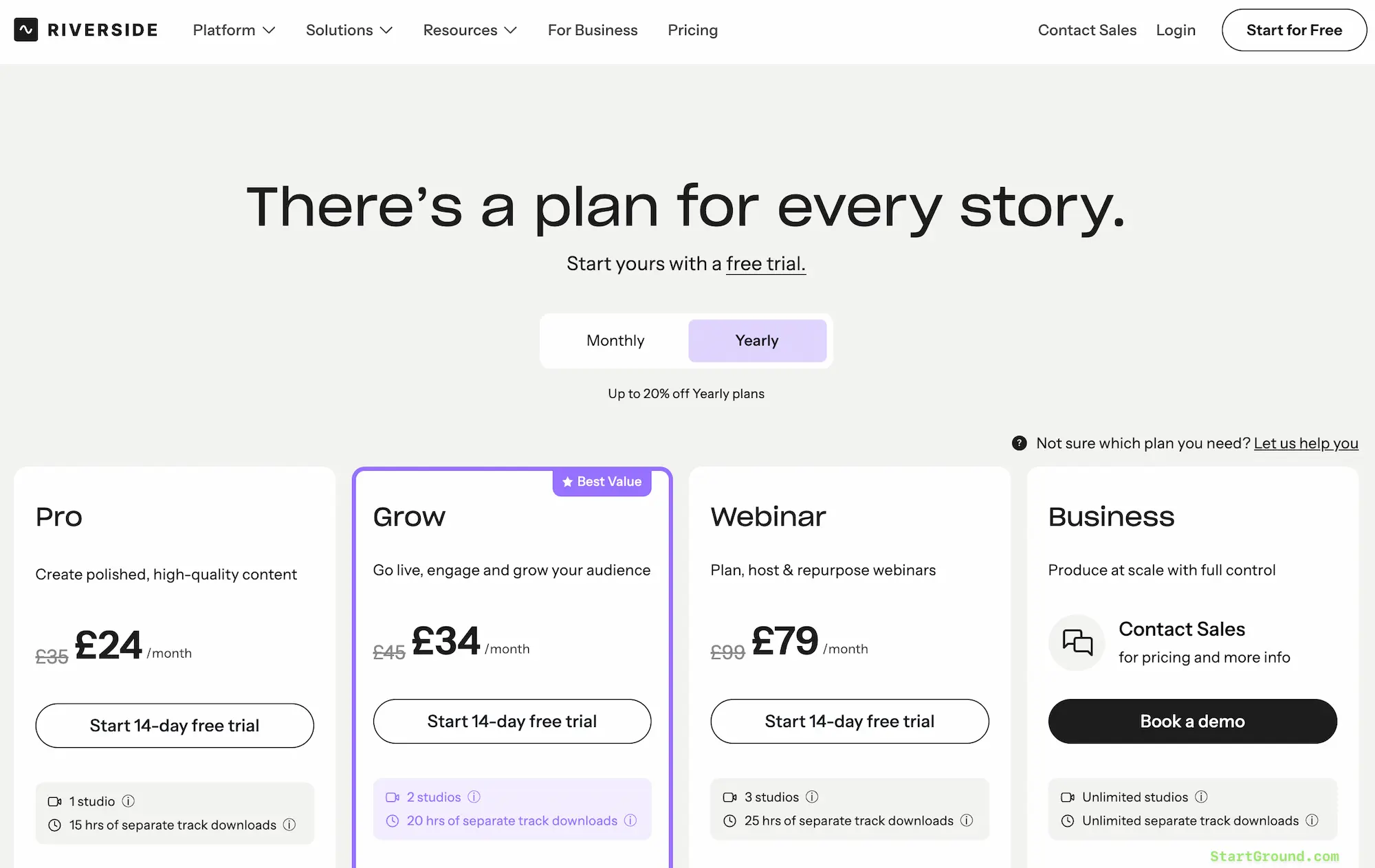
Step 4: Pick your plan and billing cycle: Choose Pro, Grow, or Webinar, then decide between monthly or yearly billing — the discount applies either way.
Step 5: Enter the promo code STARTGROUND at checkout: Type the code into the promo field on the payment screen and confirm that the reduced total shows before you submit your card details.
That should be all to claim your Riverside discount during the sign up process.
Riverside Pricing Plans and Discount
Riverside sells three self-serve tiers plus a custom-priced Business plan. Every paid tier includes a 14-day free trial, unlimited recording hours, local recording, up to 4K desktop capture, and podcast hosting, so the differences between plans come down to studios, download hours, and the growth tools layered on top.
Yearly billing already cuts up to 20% off the monthly rate. Your StartGround code stacks a further discount onto whichever first payment you make.
| Plan | Monthly | Yearly (per month) | Studios | Separate track downloads | Best for |
|---|---|---|---|---|---|
| Pro | £35 | £24 | 1 | 15 hrs/month | Solo creators and one-show podcasters |
| Grow | £45 | £34 | 2 | 20 hrs/month | Creators adding live streaming and audience growth tools |
| Webinar | £99 | £79 | 3 | 25 hrs/month | Marketers running registration-driven events |
| Business | Custom | Custom | Unlimited | Unlimited | Teams needing producer mode, SSO, and API access |
Prices display in your local currency at checkout, and Riverside quotes the same tiers in USD for US customers.
20% OFF Discounted Pricing
The code reduces your first invoice. On a monthly subscription that means a cheaper first month before the standard rate resumes; on an annual subscription it comes off the full year’s payment up front, which makes the yearly cycle the better value play if you already know Riverside fits your workflow.
Run the 14-day trial first, confirm the recording quality on your own gear, then apply the code when you want to upgrade your plan.
Riverside Overview and Features
Riverside solves a problem every remote creator hits: video calls compress your footage and your guest’s audio into something you cannot rescue in post.
The platform sidesteps the call entirely for quality purposes. Each participant’s browser records their own camera and microphone to their own device, then uploads those files progressively to the cloud while you keep talking.
What started as a recording tool now covers the full lifecycle — capture, edit, repurpose, stream, host, and publish — which is why marketing teams and podcast networks increasingly run the whole operation inside it rather than stitching four subscriptions together.
Local recording at 4K
Riverside captures up to 4K video and 48kHz uncompressed WAV audio directly on each device. Your internet connection affects the live conversation, never the file you keep. Tracks temporarily store locally and upload in the background, so within moments of hitting stop you already have finished media waiting in your dashboard instead of chasing a guest for a file transfer.
Separate tracks for every speaker
Each host and guest arrives as an individual, perfectly synced audio and video track. That separation is what makes real post-production possible: you strip out crosstalk, duck one microphone, swap layouts, or cut a guest entirely without touching anyone else’s audio. Screen shares record as their own high-quality track too, which matters when you demo software and need the pixels to stay sharp.
Text-based editing
You edit the recording by editing its transcript. Search for a phrase, delete the sentence, and the video follows. Anyone who can edit a document can now cut an episode, which removes the bottleneck of waiting for an editor to open a timeline for a five-minute trim.
Riverside also adds multi-track editing, one-click brand kits for your logo, colours, intro, and outro, and animated captions styled for vertical formats.
AI clean-up and correction
Magic Audio reduces background noise and lifts clarity so a mid-range USB microphone sounds closer to a studio chain.
The AI suite also removes filler words and silences, corrects eye contact when you glanced at your notes, generates B-roll, applies auto-layouts, and even lets you fix a misspoken line by rewriting the transcript — the model then syncs your voice and lips to match.
Repurposing with AI Co-Creator
Magic Clips scans your session for the strongest moments and cuts them into ready-to-post social videos. AI Co-Creator goes further: you chat with it, ask for a blog post, a newsletter, a thumbnail, or a headline set, and it produces the assets shaped for each channel. Show notes, titles, chapters, and keyword-rich descriptions generate automatically alongside transcription in 100+ languages.
AI translation and dubbing extend the same recording into 30+ languages when you want reach beyond an English-speaking audience.
Live streaming and webinars
Grow unlocks full HD 1080p streaming to unlimited destinations at once — YouTube, LinkedIn, Facebook, X, Twitch, or any custom RTMP endpoint — with omnichat pulling every platform’s comments into one window, plus branded overlays, lower thirds, and a backstage area for speaker prep.
The Webinar tier adds registration pages, branded email reminders, Q&A, polls, live call-ins, recurring sessions, and a native HubSpot integration that pushes registrant data into your CRM. Every event records in full quality and feeds straight back into the clip pipeline.
Podcast hosting and analytics
Hosting comes bundled with paid plans. Riverside generates your RSS feed, distributes to Spotify, Apple Podcasts, YouTube, Pocket Casts, Castbox, and the rest of the major directories, then reports streams by episode, app, and country so you can see which topics actually pulled an audience.
Apps and workflow extras
Dedicated iOS, Android, iPad, and Mac apps let you record on the move or use a phone as a second camera, and in-person multi-cam recording covers the sessions where everyone shares a table. A teleprompter holds your script, the Media Board fires intro stings and transitions live, and virtual backgrounds keep the frame tidy.
All Riverside Deals and Promotions
StartGround currently lists one exclusive Riverside offer alongside the platform’s own standing promotions.
Offer 1: 20% off your first payment with code STARTGROUND
Open the StartGround partner link, choose any consumer paid plan, and enter STARTGROUND at checkout to take 20% off that first payment. The code applies across monthly and yearly billing on every self-serve tier, and it works whether you pick Pro for a solo show or Webinar for a full events programme. The Business plan sits outside this promotion.
Offer 2: 14-day free trial on every paid tier
Riverside runs a two-week trial on Pro, Grow, and Webinar with no card charged up front. Record a real episode, test the separate tracks against your editing workflow, and only apply your promo code once you know the platform earns a place in your stack.
Offer 3: Save up to 20% with annual billing
Switching from monthly to yearly billing drops the effective monthly rate on every tier. Combine that with your StartGround code and the first year lands at the lowest entry point Riverside offers.
| Offer | What you get | How to claim |
|---|---|---|
| StartGround exclusive | 20% off the first payment on any B2C plan | Partner link + code STARTGROUND |
| Free trial | 14 days on Pro, Grow, or Webinar | Start from the partner link |
| Annual billing | Up to 20% off the monthly rate | Select yearly at checkout |
Riverside Deal FAQs
Riverside Reviews
A 4.8 average on G2 across more than 1,500 reviews puts Riverside near the top of its category, and the customer list such as Spotify, Microsoft, Marvel, and HubSpot among others tells you the platform survives enterprise scrutiny as well as solo-creator budgets.
The quality argument wins
Recording quality dominates the feedback. Creators who moved over from video-call recordings describe the jump as immediate: sharp 1080p and 4K files where they previously accepted soft, compressed footage, and clean uncompressed audio that survives mastering. Guests appreciate the one-click browser join with nothing to install, which removes the pre-recording tech support call that used to eat the first ten minutes of every session.
Time saved in post
The editing suite generates the loudest enthusiasm. Users routinely report cutting hours per episode, with several describing 10 to 15 hours saved on a single production once transcription, clip generation, and show notes stopped being manual jobs. Text-based editing gets singled out by people who never learned a traditional timeline and now ship episodes themselves.
Where the friction shows up
Browser-based local recording asks something of your machine. Older laptops and small SSDs can struggle during long 4K multi-participant sessions, and uploads take time to finish on weak connections even though the files themselves stay pristine. A handful of users find the AI credit allowances tight once they lean heavily on generation features, and the feature surface has grown broad enough that new subscribers need a session or two to find everything.
Pricing sits above the budget end of the market, which is the honest trade for the output quality.
Overall sentiment
The consistent thread across reviews is that Riverside replaces several subscriptions at once — recorder, editor, clip generator, host, and streaming tool — and that consolidation is what justifies the spend for most people who stay. Creators describe growing more excited by product updates than they expected to, which is rare feedback for a paid tool.
Riverside

Riverside is an online recording and editing platform that captures up to 4K video and uncompressed audio locally for every participant, then edits, repurposes, streams, and publishes that content from one workspace.
Price: 24
Price Currency: GBP
Application Category: MultimediaApplication
5
Pros
- Local 4K recording unaffected by internet quality.
- Separate synced tracks for every participant.
- AI editing, clips, and show notes included.
Cons
- Higher price than budget podcast tools.
- Long sessions demand strong local hardware.
- AI credit limits apply on lower tiers.
Riverside Alternatives
Riverside leads on capture quality and end-to-end workflow, though different priorities point toward different platforms.
Descript
Descript built its reputation on the same text-based editing concept and pushes further into audio production with Overdub voice cloning and a deep multitrack timeline. Riverside beats it on recording — 4K local capture with progressive upload against Descript’s lighter recording layer — while Descript suits you better if editing sophistication matters more than the session you record.

StreamYard
StreamYard focuses squarely on live output: simple multistreaming, on-screen guests, and branded layouts at a lower entry price. Riverside records locally and hands you separate 4K tracks for post-production, which StreamYard’s cloud-first model does not match, so pick StreamYard when the broadcast is the finished product rather than the raw material.
Zencastr
Zencastr targets audio-first podcasters with local recording and a straightforward publishing path at a friendly price point. Riverside offers considerably more on the video and repurposing side — AI clips, translation, webinars, streaming — and Zencastr makes sense when your show never leaves audio.
Zoom
Zoom already sits in most calendars and costs less as a meeting tool. Its recordings compress to a single mixed file, which puts a ceiling on what you can do afterwards. Riverside exists precisely because that ceiling frustrates anyone publishing the conversation rather than archiving it.
Claim Your Riverside Deal
Recording quality is the one thing you cannot fix later, and Riverside protects it from the first second of every session while handling the editing, clipping, and publishing that usually follow.
If you are launching your first show, start the 14-day trial through the StartGround partner link, record a real episode, and apply your code when you convert.
If you already publish weekly, the annual cycle plus the promo code gives you the lowest first-year entry point available on Pro or Grow.
If you run webinars for pipeline, the Webinar tier turns one live event into weeks of assets with registrant data flowing into HubSpot automatically.
Enter STARTGROUND at checkout to lock in your exclusive discount and start producing content that sounds like it came out of a studio.
This offer is verified by StartGround in partnership with Riverside. T&Cs apply. Valid on monthly and yearly plans across all consumer/self-serve tiers; not valid on the Business plan; the promo code must be entered at checkout; the discount applies to the first payment only.
RElated Categories:
Author: Pradeep Singh
Pradeep Singh is an entrepreneur and founder of StartGround, a platform dedicated to empowering startups and entrepreneurs with the best software deals and resources. With years of experience building and guiding startups to success, he’s passionate about helping entrepreneurs to access essential tools, best resources, and growth opportunities.