ClickUp Promo Code (2026): Get 20% OFF Unlimited & Business Plans

Written By:
Pradeep Singh
Last Updated: March 28, 2026
Disclosure: This post may contain affiliate links, meaning if you decide to make a purchase via my links, I may earn a commission at no additional cost to you. See my disclosure for more info.
ClickUp gives you a single platform to manage tasks, track projects, and collaborate with your team — and right now, StartGround has partnered with ClickUp to offer an exclusive 20% discount on both Unlimited and Business plans for a full year. This deal applies automatically when you sign up through the StartGround partner link, so there is nothing extra to enter at checkout.
Trusted by millions of teams worldwide — including companies like IBM, Netflix, and Spotify — ClickUp consolidates project management, docs, chat, time tracking, and goals into one workspace. The platform replaces fragmented toolchains and gives growing teams a centralized hub for every workflow.
| ClickUp StartGround Deal | Details |
|---|---|
| Partner Offer | 20% OFF Unlimited and Business plans for 1 year |
| Discount Type | Percentage discount on annual subscription |
| Eligibility | New ClickUp users signing up via the StartGround partner link |
| Redemption Method | Discount applied automatically through the partner link |
This is a verified StartGround partner offer.
Steps to Claim ClickUp Deal
Getting your ClickUp discount takes just a few minutes. Follow these steps to lock in the exclusive StartGround rate.
Step 1: Visit the exclusive ClickUp page for StartGround deal: Head to this exclusive ClickUp partner page for StartGround users with the discount reflected on the page.
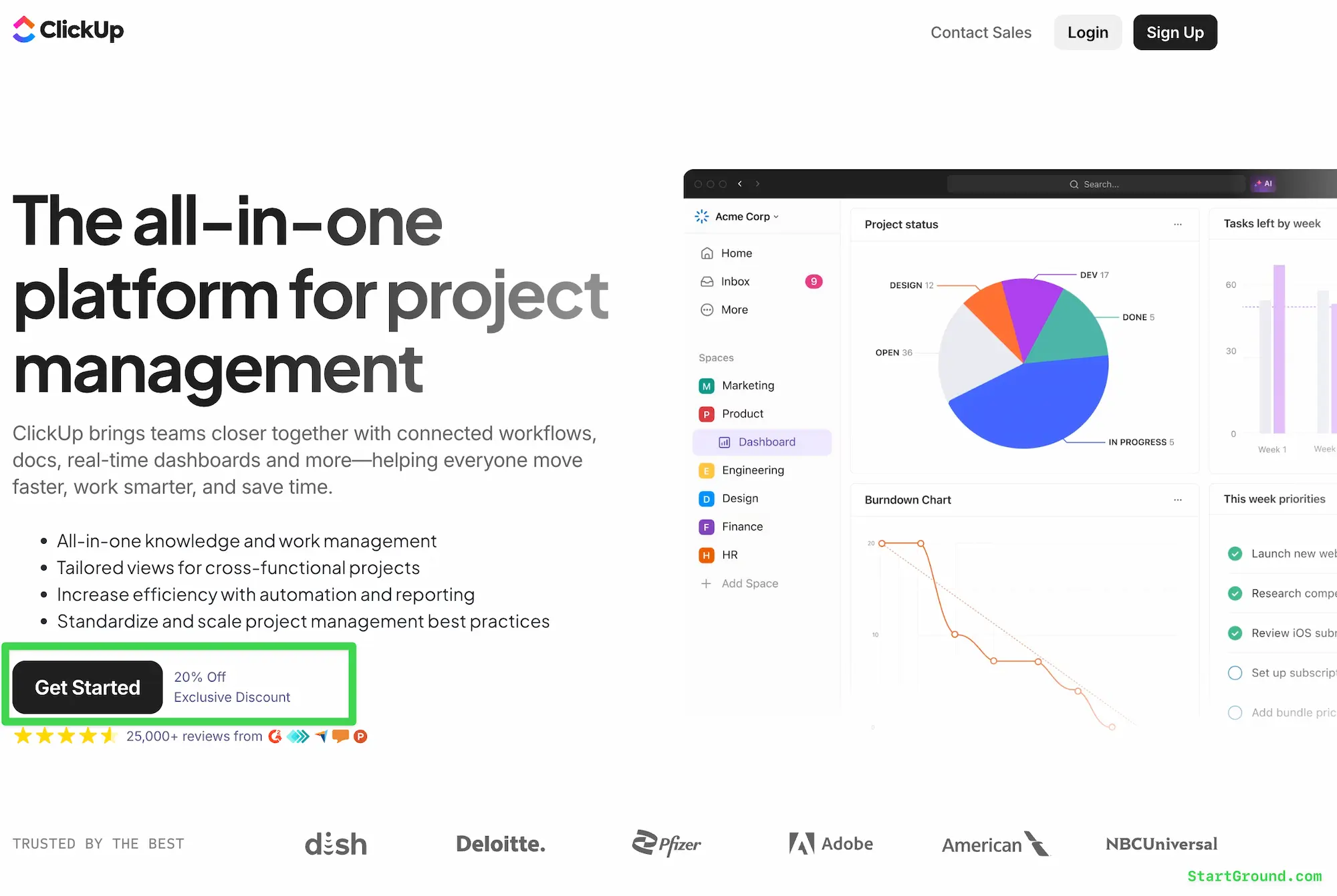
As you can see in the screenshot, this exclusive landing page reflects the exclusive 20% OFF for StartGround users.
Step 2: Choose your plan: Select either the Unlimited or Business plan depending on the features your team needs — the discount covers both options.
Step 3: Complete your sign-up: Create your ClickUp workspace, invite your team members, and finalize the purchase — the discount reflects in your total automatically at checkout.
ClickUp Pricing Plans and Discount
ClickUp structures its pricing across four core tiers, each designed for a different stage of team growth. The StartGround exclusive discount applies to the two most popular paid plans — Unlimited and Business — making them even more accessible for startups and scaling businesses.
| Plan | Standard Price (per user/mo, billed yearly) | With StartGround 20% OFF | Best For |
|---|---|---|---|
| Free Forever | $0 | N/A | Solo users and small teams exploring the platform |
| Unlimited | $7 | Discounted | Growing teams needing unlimited storage, integrations, and time tracking |
| Business | $12 | Discounted | Mid-size teams requiring advanced dashboards, automations, and reporting |
| Enterprise | Custom pricing | N/A | Large organizations with compliance, SSO, and governance requirements |
Free Forever Plan
The Free Forever tier gives you unlimited tasks, unlimited members, and core features like Kanban boards, calendar view, collaborative docs, and sprint management. You also get 60MB of storage, two-factor authentication, and 24/7 support. It works well for individuals or very small teams testing ClickUp before committing to a paid plan.
The free tier does come with limitations. Storage caps out quickly, you only get one form, and you miss out on advanced features like Gantt charts, native time tracking, and goal management. For any team that plans to scale, upgrading unlocks the tools that make ClickUp genuinely powerful.
Unlimited Plan
The Unlimited plan removes nearly every restriction from the free tier. You get unlimited storage, unlimited integrations, unlimited Gantt charts, and unlimited custom fields. Native time tracking, goal and portfolio management, resource management, and guest access with permission controls all come standard.
ClickUp Chat lives in this tier as well, along with email integration and connections to tools like Slack, HubSpot, and Google Drive. For teams that rely on multiple platforms, the Unlimited plan turns ClickUp into the central layer that connects everything.
Business Plan
Business builds on top of Unlimited with features designed for operational maturity. You get unlimited dashboards with advanced cards, advanced timeline views, 5,000 automations per month, mind mapping, private whiteboards, and custom exporting. Sprint points, portfolio workload management, and Google SSO round out a plan that suits teams managing complex, cross-functional work.
The automation limit alone — 5,000 per month — saves significant manual effort across project pipelines, recurring tasks, and status-based triggers.
Enterprise Plan
Enterprise pricing is custom and requires a direct conversation with ClickUp’s sales team. This tier adds enterprise-grade permissions, SAML SSO with SCIM provisioning, audit logs, session management, custom branding, data residency options, and a dedicated customer success manager. Organizations with strict compliance requirements — HIPAA, SOC 2, ISO 27001 — will find the governance features they need here.
ClickUp AI Pricing
ClickUp also offers separate AI add-on plans built around its Brain AI engine. The free tier gives you trial access to AI features across chat, tasks, and docs. The Brain AI plan unlocks unlimited AI chat across ChatGPT, Claude, and Gemini, along with enterprise search and 1,500 AI Super Credits per month. The Everything AI plan adds ambient answers, AI notetaker, AI fields, AI automations, image generation, and 5,000 monthly Super Credits.
| AI Plan | Price (per user/mo) | Key Highlights |
|---|---|---|
| Free Forever | $0 | Trial AI access across chat, tasks, and docs |
| Brain AI | $9 | Unlimited AI chat, enterprise search, 1,500 Super Credits |
| Everything AI | $28 | Full AI suite: notetaker, fields, automations, 5,000 Super Credits |
| AI Super Credits | $0.001 per credit | Pay-as-you-go for agents, automations, and image generation |
ClickUp Overview and Features
ClickUp positions itself as the everything app for work. That is a bold claim, but the platform backs it up with a feature set that genuinely covers project management, documentation, communication, time tracking, goal setting, and now AI-driven automation — all within a single workspace. The company serves teams across marketing, engineering, product, HR, IT, and leadership functions, and it has built enough depth in each area to stand as a real alternative to specialized point solutions.
Most competitors charge extra for features that ClickUp includes by default. That matters when you are evaluating total cost of ownership across a growing organization.
Task and Project Management
ClickUp’s core revolves around a hierarchical structure of Spaces, Folders, Lists, and Tasks. You define your workspace architecture once and then manage everything — from high-level initiatives to granular subtasks — within that framework. Every task supports assignees, due dates, priorities, custom statuses, dependencies, checklists, and attachments.
The flexibility here stands out. You can build custom workflows per team, set up recurring tasks to eliminate repetitive setup, and use task templates to standardize processes across departments. Sprint management tools cater to agile teams, while Gantt charts and timeline views serve teams running waterfall or hybrid methodologies.
Multiple Views
One workspace, many perspectives. ClickUp lets you switch between List, Board (Kanban), Calendar, Gantt, Timeline, Table, and Map views — all drawing from the same underlying data. A marketing manager can view campaigns on a calendar while a developer reviews the same work on a Kanban board.
The Everything View aggregates tasks across your entire workspace into a single searchable, filterable surface. That is particularly useful for leadership teams tracking progress across multiple departments without jumping between Spaces.
Docs and Wikis
ClickUp Docs provide a built-in documentation layer directly connected to your tasks. You create, edit, and share documents inside the same workspace where your projects live, eliminating the need for a separate wiki tool. Real-time collaboration, nested pages, embedded tasks, rich formatting, and commenting all come standard.
Teams use Docs for everything from meeting notes and SOPs to product specs and knowledge bases. The tight integration with tasks means you can link a document to a specific project, embed live task lists inside a page, and keep your documentation living alongside the work it describes.
Time Tracking
Native time tracking removes the need for a third-party tool like Harvest or Toggl. You start and stop timers directly on tasks, log time manually, add notes to time entries, and generate reports that break down where your team’s hours go. Billable and non-billable time categories help agencies and consultancies track profitability per project.
Time estimates let you set expected durations for tasks, and ClickUp compares those estimates against actual logged time — giving you data to improve your planning accuracy over time.
Automations and Workflows
ClickUp’s automation engine lets you build custom triggers and actions that eliminate manual busywork. When a task status changes, automatically reassign it. When a due date arrives, send a notification. When a form is submitted, create a task in the right list with the right assignee.
The Business plan includes 5,000 automations per month, and the Enterprise tier scales to 250,000. You can also connect automations to external tools through webhook integrations, making ClickUp the orchestration layer for cross-platform workflows.
Goals and OKRs
Goal tracking in ClickUp goes beyond simple to-do lists. You set measurable targets — numerical, monetary, true/false, or task-based — and track progress automatically as linked tasks move forward. Roll-up tracking aggregates individual goals into higher-level objectives, giving leadership a live view of company-wide progress.
This feature works well for teams running OKR frameworks. You define your objectives, link key results to specific tasks or metrics, and let the platform calculate progress without manual updates.
Dashboards and Reporting
ClickUp Dashboards give you customizable, real-time views into project health, team workload, time tracking data, and sprint velocity. The Business plan unlocks advanced dashboard cards — including burndown and burnup charts, cumulative flow diagrams, and custom calculation widgets.
You build dashboards per team, per project, or per executive audience. The ability to embed charts, task lists, and portfolio summaries in a single view means stakeholders get the information they need without digging through individual projects.
Integrations Ecosystem
ClickUp connects natively with over 1,000 tools — Slack, Google Drive, GitHub, HubSpot, Salesforce, Outlook, Figma, and many more. The API opens up custom integrations for teams with specific workflows, and Zapier support extends connectivity to thousands of additional platforms.
Import tools let you migrate data from Monday, Asana, Trello, Jira, and other project management platforms in minutes, making the switch to ClickUp significantly less painful than starting from scratch.
ClickUp Chat and Communication
ClickUp Chat gives teams a built-in messaging layer, so conversations about work happen right next to the work itself. You can chat within tasks, in dedicated channels, or across Spaces — and every message stays connected to the relevant context.
Most project management tools force you to switch to Slack or Teams for real-time communication. ClickUp’s approach keeps discussions, decisions, and task updates in a single thread, reducing the context-switching that kills productivity.
Brain AI and Super Agents
ClickUp Brain brings AI directly into your workspace. The AI assistant answers questions about your projects, summarizes docs, drafts content, generates subtasks, and surfaces information from across your workspace using enterprise search. It operates across ChatGPT, Claude, and Gemini models, so you get access to multiple AI engines without separate subscriptions.
Super Agents take AI further. These are custom AI teammates that you build to handle specific workflows — intake management, task assignment, project tracking, or answering team questions — running 24/7 with access to your full workspace context. The combination of ambient AI and purpose-built agents represents ClickUp’s vision for maximizing human productivity through automation.
All ClickUp Deals and Promotions
StartGround currently offers one verified ClickUp deal. This is an exclusive partner offer negotiated directly with the ClickUp team.
Offer: 20% OFF Unlimited and Business Plans for 1 Year
Sign up through the StartGround partner link to receive 20% off your first year on either the ClickUp Unlimited or Business plan. The discount applies automatically at checkout — just select your preferred plan and complete your workspace setup. This offer targets new ClickUp users who want to access advanced project management features at a reduced annual rate.
The deal covers all the features in your chosen plan with no restrictions. You get the same unlimited storage, integrations, automations, and support that regular subscribers receive, at a lower price point for the first twelve months.
ClickUp Deal FAQs
ClickUp Reviews
ClickUp has built a substantial user base across industries, and the feedback reflects a platform that delivers serious depth — with a learning curve to match. Review aggregates across major platforms place ClickUp consistently in the 4.5 out of 5 range, which aligns with how teams experience the product once onboarding is complete.
Consolidation as the Core Win
The single biggest theme across ClickUp reviews is consolidation. Teams that previously juggled Asana for tasks, Slack for messaging, Notion for docs, and Harvest for time tracking report that ClickUp replaced multiple subscriptions with one platform. The cost savings matter, but the real win is eliminating the context-switching that drags down productivity.
Users running cross-functional teams — where marketing, engineering, and operations all need shared visibility — tend to see the fastest return on investment.
Customization Depth
Power users consistently highlight ClickUp’s customization as a differentiator. Custom fields, custom statuses, multiple views per list, and flexible automation rules let teams mold the platform to fit their exact workflow rather than adapting their process to fit the tool. Filtered views and dashboard cards let managers pull targeted reports without chasing team members for updates.
That said, this customization depth is a double-edged sword.
The Learning Curve
The most common criticism of ClickUp centers on its initial complexity. The sheer number of features, views, and configuration options can overwhelm new users — especially teams migrating from simpler tools like Trello or Basecamp. ClickUp University, webinars, and 24/7 support help, but the onboarding period requires real investment.
Teams that standardize a few templates before rolling ClickUp out company-wide tend to adopt faster and avoid the feature paralysis that trips up unstructured deployments.
Mobile Experience
ClickUp’s mobile app receives positive marks for parity with the desktop experience. Managing tasks, reviewing dashboards, and responding to chat messages on the go works smoothly, which matters for distributed teams and managers who need visibility outside of their desk.
ClickUp
ClickUp is a project management and productivity platform that brings tasks, docs, chat, goals, time tracking, and automations together in one workspace for teams across every department and industry.
Price: 6
Price Currency: USD
Application Category: BusinessApplication
5
Pros
- Replaces multiple tools in one platform.
- Generous free plan with unlimited tasks.
- Deep customization for any workflow.
Cons
- Steep learning curve for new users.
- Feature density can overwhelm small teams.
- AI features require separate paid add-on.
ClickUp Alternatives
ClickUp delivers an exceptionally broad feature set, but different teams have different priorities. If you value simplicity over depth, or you need a tool optimized for a specific function, these alternatives deserve consideration.
Notion
Notion excels as a knowledge management and documentation platform. Its block-based editor makes it easy to build wikis, databases, project boards, and internal tools — all with a clean, minimal interface. Notion lacks native time tracking, Gantt charts, and the automation depth that ClickUp offers, but for teams that prioritize docs and lightweight project tracking over full-scale project management, it fits well.

6 Months Free – Business Plan
Monday.com
Monday.com offers a visually intuitive interface with strong automation capabilities and a gentle learning curve. It works well for marketing teams, operations teams, and any group that wants structured workflows without heavy configuration. Monday does not match ClickUp’s feature breadth — particularly around docs, chat, and goal tracking — but it gets teams productive faster out of the box.
Asana
Asana remains one of the most popular project management platforms for mid-size teams. It handles task management, project timelines, and portfolio tracking with a polished user experience. Asana’s reporting has improved significantly, though it still trails ClickUp on customization options and native integrations. Teams that want a focused project management tool without the everything-app ambition often prefer Asana’s more streamlined approach.
Jira
Jira dominates in software development environments. Its sprint management, backlog grooming, and issue tracking capabilities are purpose-built for engineering teams running agile workflows. ClickUp offers competitive agile features, but Jira’s deep integration with Confluence, Bitbucket, and the Atlassian ecosystem gives it an edge for dev-heavy organizations. Non-technical teams, however, tend to find Jira’s interface unintuitive.
Smartsheet
Smartsheet appeals to teams that think in spreadsheets. Its grid-based interface feels familiar to Excel and Google Sheets users, and it layers project management features — Gantt charts, automations, dashboards — on top of that tabular foundation. Smartsheet works well for PMOs and operations teams managing large-scale programs, though it lacks the collaboration and communication features that ClickUp bundles in.
Claim Your ClickUp Deal
If you have been evaluating project management platforms, getting 20% off ClickUp’s most popular plans for a full year shifts the value equation significantly. Few productivity tools offer this combination of task management, docs, chat, time tracking, goals, and AI in a single subscription — and the StartGround partner deal makes it more affordable to experience the full platform.
If you are building a startup and need to move fast, the Unlimited plan gives you everything required to manage projects, track time, and collaborate across your team without hitting feature walls.
If you run a scaling company with complex workflows, the Business plan’s advanced dashboards, automations, and reporting tools keep operations running smoothly as your headcount grows.
Head to the StartGround deal page, click the partner link, and lock in your exclusive discount before your next billing cycle starts.
This offer is verified by StartGround in partnership with ClickUp. T&Cs apply.
Author: Pradeep Singh
Pradeep Singh is an entrepreneur and founder of StartGround, a platform dedicated to empowering startups and entrepreneurs with the best software deals and resources. With years of experience building and guiding startups to success, he’s passionate about helping entrepreneurs to access essential tools, best resources, and growth opportunities.