Buffer Promo Code (2026): Claim 2 Months Free Deal + 14-Day Trial

Written By:
Pradeep Singh
Last Updated: March 6, 2026
Disclosure: This post may contain affiliate links, meaning if you decide to make a purchase via my links, I may earn a commission at no additional cost to you. See my disclosure for more info.
If you manage social media for your brand, side project, or clients, Buffer gives you one clean workspace to plan, schedule, publish, and measure content across every major platform. Right now, StartGround users can claim an exclusive deal that includes a 14-day free trial plus 2 months free on any annual paid plan.
Buffer powers over 191,000 active users and helped publish nearly 8 million posts last month alone. The platform supports 11 social networks, from Instagram and TikTok to LinkedIn, Bluesky, and Threads, making it one of the most connected scheduling tools on the market.
| Buffer StartGround Deal | Details |
|---|---|
| Partner Promo Code | Exclusive Partner Link |
| Offer | 14-day free trial + 2 months free on annual plans |
| Eligibility | New Buffer users signing up through StartGround |
| Redemption Method | Claim via StartGround exclusive link |
Steps to Claim Buffer Deal
Follow these steps to activate your exclusive Buffer discount through StartGround.
Step 1: Visit the Buffer Pricing page: Use our exclusive partner link to open the Buffer offer page with your discount pre-applied.
Step 2: Create your Buffer account: Enter your email address and set up a new Buffer account directly from the sign-up screen.
Step 3: Start your 14-day free trial: Choose any paid plan (Essentials or Team) and your free trial begins immediately with full access to all features.
Step 4: Select annual billing to unlock 2 months free: When prompted for billing frequency, select the annual option. The 2 months free discount applies automatically because you signed up through the StartGround discounted link.
Step 5: Connect your social channels and start scheduling: Link your social media profiles and begin creating, scheduling, and analyzing your content right away.
Buffer Pricing Plans and Discount
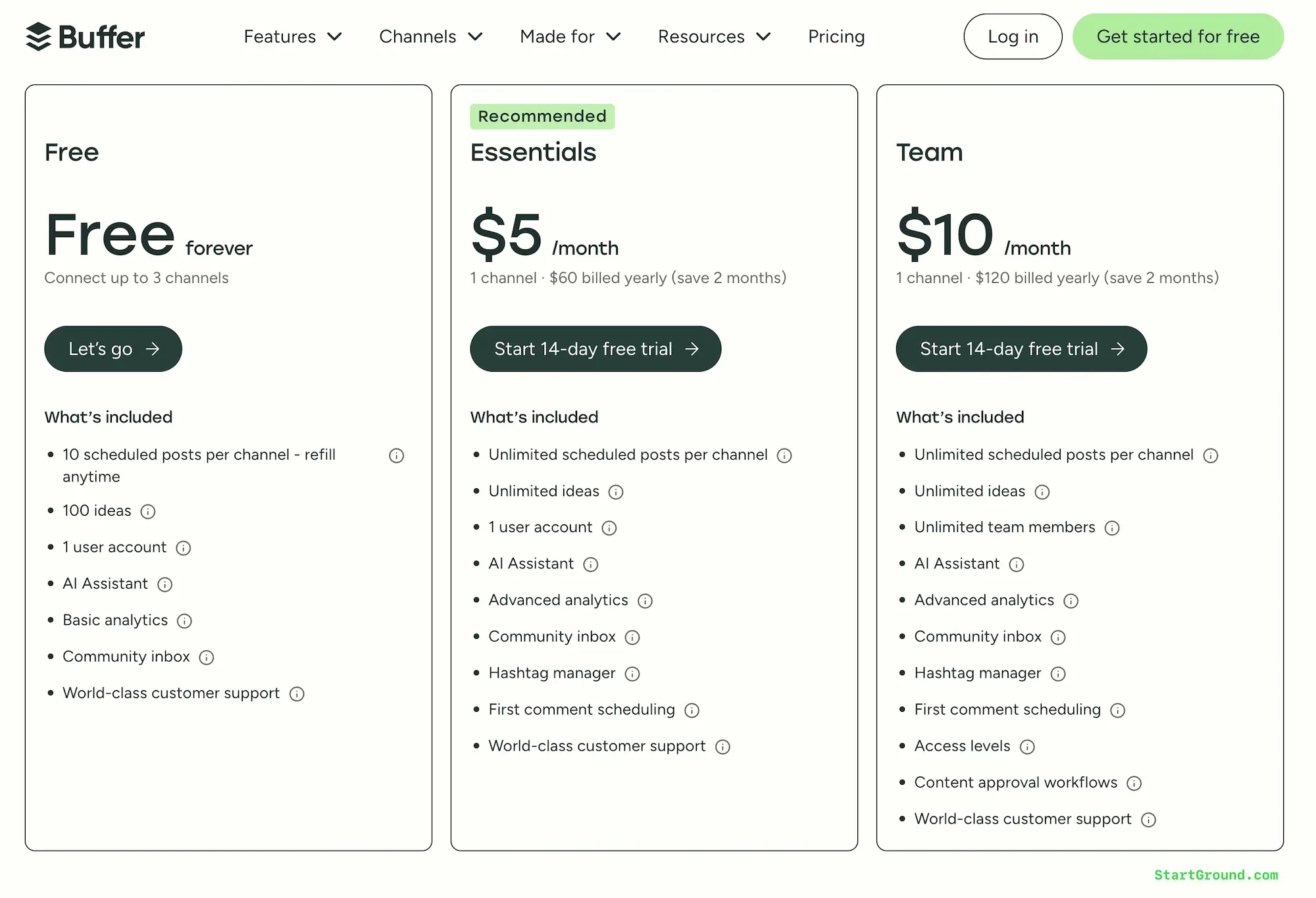
Buffer keeps its pricing transparent and straightforward. Every plan is priced per channel, so you only pay for the social accounts you actually manage. The StartGround deal sweetens this by giving you a 14-day free trial plus 2 months free when you commit to an annual plan through our partner link.
Here is a breakdown of every Buffer plan and what you get at each tier.
| Buffer Feature | Free Plan | Essentials Plan | Team Plan |
|---|---|---|---|
| Monthly Price per Channel | $0 | $5/mo | $10/mo |
| Annual Price per Channel | $0 | $5/mo (billed yearly) | $10/mo (billed yearly) |
| Channels Included | Up to 3 | 1+ (pay per channel) | 1+ (pay per channel) |
| Scheduled Posts per Channel | 10 | Unlimited | Unlimited |
| Ideas Storage | 100 | Unlimited | Unlimited |
| User Accounts | 1 | 1 | Unlimited |
| AI Assistant | Included | Included | Included |
| Analytics | Basic (30-day history) | Advanced (unlimited) | Advanced (unlimited) |
| Community Inbox | Included | Included | Included |
| Hashtag Manager | Not included | Included | Included |
| First Comment Scheduling | Not included | Included | Included |
| Approval Workflows | Not included | Not included | Included |
| Custom Access & Permissions | Not included | Not included | Included |
| Branded Reports | Not included | Not included | Included |
Free Plan
The Free plan lets you connect up to 3 social channels and schedule 10 posts per channel at any time. Once a post publishes, that slot opens up again. You also get access to the AI Assistant, basic analytics with 30 days of history, the community inbox for managing comments, and all standard integrations. This plan works well if you run a personal brand or are testing the platform before committing to a paid tier.
Essentials Plan
At $5 per month per channel on annual billing, the Essentials plan removes all scheduling limits and upgrades your analytics from basic to advanced. You get unlimited ideas storage, the hashtag manager for saving and reusing hashtag sets, first comment scheduling on Instagram and LinkedIn, custom video covers, and channel grouping for bulk scheduling.
Performance overviews, audience demographics, best time to post recommendations, exportable reports, and custom UTM parameters all unlock at this tier. For solo creators and small business owners who post regularly, Essentials delivers the features that matter most without unnecessary complexity.
Team Plan
The Team plan costs $10 per month per channel on annual billing and adds everything a multi-person operation needs. You get unlimited team members, content approval workflows, custom access and permissions so you can control who drafts and who publishes, internal notes on posts, and branded reports with your logo and a generated cover page. Agencies and marketing departments that manage shared social accounts across several team members will find this plan built for their workflow.
Volume Discounts
Buffer applies volume pricing when you manage more than 10 channels. Channels 1 through 10 stay at the standard rate, and every channel above 10 costs less per channel. Your total bill grows as you add profiles, but the average cost per channel decreases. This scaling model benefits agencies and businesses managing large portfolios of social accounts.
How the StartGround Deal Applies
When you sign up through the StartGround exclusive link and choose annual billing, you receive 2 months free on top of the 14-day trial. That means you pay for 10 months instead of 12 on your first year, which can save you up to two full months of subscription costs across every channel you manage.
Buffer Overview and Features
Buffer is a social media management platform designed around clarity and simplicity. Rather than packing in enterprise-grade complexity, Buffer focuses on the core actions that drive consistent social media growth: planning content, publishing on schedule, engaging with your audience, and understanding what performs well. The result is a workspace that feels calm and intuitive, even when you manage multiple brands or channels.
The platform connects to 11 social networks, including Instagram, Facebook, TikTok, LinkedIn, Threads, Bluesky, YouTube Shorts, Pinterest, Google Business Profile, Mastodon, and X. You can handle scheduling, analytics, and community engagement for all of them from a single dashboard.
Content scheduling across 11 platforms
Buffer lets you write a post once and distribute it to every connected channel simultaneously or customize each version for the platform it targets. The scheduling queue accepts text, images, video, and carousels depending on the network. You can set posting times manually or let Buffer recommend optimal slots based on your audience data. Threaded posts work natively on X, Bluesky, Threads, and Mastodon, and reminder notifications prompt you to finalize posts that require native finishing touches, such as Instagram Reels or TikTok videos.
Visual content calendar
The calendar view displays your entire posting schedule across weeks or months in a visual layout. You can drag and drop posts to reschedule them, spot content gaps at a glance, and plan campaigns around key dates. This overview eliminates the guesswork of wondering when your last post went out or whether you have enough content queued for the week ahead.
Ideas board with kanban organization
Buffer’s Create space gives you a dedicated place to capture ideas the moment they strike. You can store up to 100 ideas on the Free plan or unlimited ideas on paid plans, tag them by campaign or topic, and organize them into kanban-style columns. When you are ready to turn an idea into a post, you move it directly into the scheduling queue. This approach separates brainstorming from publishing, so your content pipeline stays full without cluttering your posting queue.
AI Assistant for content creation
The built-in AI Assistant helps you brainstorm post ideas, rewrite drafts for different tones, and generate platform-specific variations of your content. Every plan includes unlimited AI credits, so you can use it as heavily as you need without worrying about usage caps. The assistant also powers AI-generated replies in the community inbox, learning your voice so suggested responses sound like you wrote them.
Community inbox for comment management
Buffer consolidates comments from Threads, LinkedIn, Bluesky, Facebook, Instagram, and X into one filterable dashboard. You can triage, respond, and track engagement without switching between apps. A comment score tracks your consistency and response speed, and you can turn standout comment exchanges into new posts with a single click. Saved replies let you respond to common questions quickly while keeping your tone authentic.
Advanced analytics and reporting
Paid plans unlock advanced analytics that go beyond basic engagement counts. You get performance overviews showing impressions, reach, and engagement trends over time, audience demographic breakdowns by age, gender, and location, and best time to post recommendations tailored to your data. Custom analytics let you tag content by campaign and measure results across categories. Reports export as spreadsheets, PDFs, or images, and the Team plan adds branded reports with your logo for client-facing deliverables.
Collaboration and approval workflows
The Team plan introduces multi-user collaboration with drafts, internal notes, and approval workflows. You control which team members have access to which channels and whether they can publish directly or need approval first. This structure keeps content quality consistent across a team without creating bottlenecks, because drafters, editors, and publishers each operate within defined roles.
Start Page for bio links
Buffer includes Start Page, a customizable landing page that sits behind your social bio link. You can add links to your content, products, or resources and style the page with your brand colors and images. Start Page counts as one of your connected channels, so it fits naturally into your existing plan without extra costs.
Integrations with design and productivity tools
Buffer connects to Canva, Unsplash, Dropbox, Google Drive and Photos, OneDrive, Zapier, IFTTT, WordPress, Feedly, Pocket, and Bitly. These integrations let you pull in visuals, automate workflows, and share content from the tools you already use without leaving the Buffer dashboard.
All Buffer Deals and Promotions
StartGround currently offers one verified deal for Buffer. Choose it based on your situation and subscription needs.
Offer 1: 14-day free trial + 2 months free on annual plans
This is the primary StartGround partner offer. When you sign up through our exclusive link, you get a full 14-day free trial on any paid plan (Essentials or Team), followed by 2 months free when you select annual billing. The discount applies automatically at checkout because it is tied to the partner link. You pay for 10 months instead of 12 in your first year, saving you up to two full billing cycles depending on how many channels you connect.
| Deal | What You Get | Who It’s For | How to Claim |
|---|---|---|---|
| StartGround Partner Deal | 14-day free trial + 2 months free on annual plans | New Buffer users on Essentials or Team | Sign up via partner link |
Buffer’s standard offers
Buffer also runs its own promotions independently of StartGround. The platform offers a permanent Free plan with 3 channels and 10 scheduled posts per channel, a standard 14-day free trial on paid plans (without the 2 months free bonus), and a 50% discount for verified nonprofit organizations and charities. The StartGround deal stacks the free trial with additional savings that Buffer does not offer directly on its website.
Buffer Deal FAQs
Buffer Reviews
Buffer has earned a strong reputation among solo creators, small business owners, and lean marketing teams who prioritize simplicity over feature overload. The platform holds a solid rating across major review platforms, reflecting consistent satisfaction with its core scheduling and analytics capabilities.
What users appreciate most
The most common praise centers on how easy Buffer is to learn and use. The interface strips away unnecessary complexity, letting you schedule posts, view your calendar, and check analytics without a steep learning curve. Users frequently highlight the time savings, with some reporting 4 to 5 hours saved per week by consolidating social media management into a single dashboard. The AI Assistant also receives positive feedback for helping generate content ideas and rewrite drafts quickly.
Standout features in practice
The browser extension gets consistent praise for letting you share content directly from any web page into your Buffer queue. Multi-platform scheduling saves significant time for users who post the same or similar content across several networks. The visual calendar gives marketing managers a bird’s-eye view of their content strategy, making campaign planning much easier than managing individual platform dashboards.
Common points of constructive feedback
Users managing large teams or complex publishing workflows sometimes find Buffer’s collaboration tools limited compared to enterprise platforms. Advanced analytics, while strong for most use cases, lack deep attribution modeling and competitive benchmarking that larger organizations may require. The community inbox handles moderate engagement volumes well, but brands receiving hundreds of comments daily may need a more specialized engagement tool alongside Buffer. Cost can also scale quickly if you manage many channels, though the volume discount helps offset this for larger accounts.
Overall sentiment
Buffer consistently earns praise for doing the fundamentals well. It does not try to be an all-in-one enterprise suite, and that focus is exactly why its users stay loyal. For creators, small businesses, and agencies that value a clean workflow over feature bloat, Buffer delivers exactly what it promises.
Buffer

Buffer is a social media management platform that helps you schedule posts, manage engagement, and analyze performance across 11 social networks from a single, intuitive dashboard.
Price: 5
Price Currency: USD
Application Category: SocialNetworkingApplication
4.5
Pros
- Clean, intuitive interface for all skill levels.
- Supports 10+ social platforms natively.
- Transparent and predictable pricing structure.
Cons
- Limited advanced analytics for enterprises.
- Basic engagement tools for high-volume brands.
- Collaboration features only on Team plan.
Buffer Alternatives
Buffer is an excellent choice for straightforward social media scheduling and analytics, but your specific needs may point you toward a different platform. Here are the top alternatives worth considering.
Hootsuite
Hootsuite positions itself as a comprehensive social media command center with advanced monitoring, social listening, and team management tools. It supports a wider range of enterprise features than Buffer, including competitive analysis and sentiment tracking. The trade-off is a steeper learning curve and higher price point. If you need deep social listening or manage a large enterprise team, Hootsuite offers capabilities that Buffer intentionally leaves out.
Sprout Social
Sprout Social targets mid-market and enterprise teams with robust CRM-style engagement tools, advanced reporting, and employee advocacy features. Its Smart Inbox centralizes messages across all platforms with tagging and assignment capabilities that go beyond Buffer’s community inbox. Pricing starts significantly higher, but organizations that need sophisticated engagement tracking and client reporting often find the investment justified.
Loomly
Loomly focuses heavily on content creation and collaboration workflows. It provides post ideas based on trending topics, RSS feeds, and date-based events, giving your team built-in inspiration for every post. Approval workflows and content calendars are central to the experience. If your team spends more time brainstorming and refining content than analyzing performance, Loomly may suit your creative process better than Buffer.
SocialBee
SocialBee emphasizes content categorization and evergreen recycling. You can organize posts into categories and set schedules for each category independently, ensuring a balanced content mix without manual intervention. It also supports RSS automation and Canva integration. If you rely heavily on evergreen content and want automated rotation, SocialBee fills a niche that Buffer does not prioritize.
Later
Later built its reputation around visual planning for Instagram and has since expanded to TikTok, Pinterest, Facebook, LinkedIn, and X. Its drag-and-drop visual planner and Linkin.bio feature make it particularly strong for visually driven brands. If your strategy centers on Instagram and visual content, Later offers specialized tools that complement or compete with Buffer depending on your priorities.
| Feature | Buffer | Hootsuite | Sprout Social | Loomly | SocialBee | Later |
|---|---|---|---|---|---|---|
| Starting Price (per month) | Free / $5 | ~$99 | ~$249 | ~$32 | ~$29 | Free / $25 |
| Social Platforms Supported | 11 | 10+ | 10+ | 10+ | 9 | 7 |
| AI Assistant | Included (all plans) | Paid add-on | Included | Limited | Included | Limited |
| Community Inbox | Included | Included | Advanced CRM | Basic | Not included | Not included |
| Approval Workflows | Team plan only | Included | Included | Included | Not included | Not included |
| Content Recycling | Not included | Not included | Not included | Limited | Core feature | Not included |
| Visual Content Calendar | Included | Included | Included | Included | Included | Included |
| Free Plan | Yes (3 channels) | No | No | No | No | Yes (1 profile) |
| StartGround Deal | 14-day trial + 2 months free | Available | Available | Not available | Available | Not available |
Claim Your Buffer Deal
You now have a complete picture of what Buffer offers, how its pricing works, and how the StartGround deal saves you money on your first year.
If you are a solo creator building your audience, start with the Essentials plan to unlock unlimited scheduling and advanced analytics through our exclusive partner link.
If you run a small business or agency managing multiple social accounts, the Team plan gives your entire team access to collaboration tools and branded reports, and the 2 months free deal makes the annual commitment even more affordable.
If you just want to explore the platform risk-free, the 14-day trial lets you test every feature before you commit a single dollar.
Claim your Buffer deal today through the StartGround partner link and start scheduling smarter.
This offer is verified by StartGround in partnership with Buffer. T&Cs apply.
Tags:
Author: Pradeep Singh
Pradeep Singh is an entrepreneur and founder of StartGround, a platform dedicated to empowering startups and entrepreneurs with the best software deals and resources. With years of experience building and guiding startups to success, he’s passionate about helping entrepreneurs to access essential tools, best resources, and growth opportunities.