

Google now lets you choose which publishers appear first in your search results. Add StartGround.com as a preferred source, and you will see verified software deals and startup offers from our platform at the top of your results whenever they exist for the tools you search for. The whole process takes under a minute.
This guide walks you through every step and you will learn why this small change protects you from the fake coupon sites that flood Google with auto-generated deal pages leading nowhere.
| Quick Reference | Details |
|---|---|
| What you are setting up | StartGround.com as a Google Preferred Source |
| Time required | Under 1 minute |
| Direct setup link | Add StartGround on Google |
| Requirement | A Google account (signed in) |
| Cost | Free |
| Works on | Desktop and mobile, all countries and languages |
Add StartGround Using the Direct Link
The fastest way to set this up is through Google’s source preferences page with StartGround pre-loaded.
Step 1: Open the StartGround preferences link: Click or tap this direct link. The page opens with StartGround already entered in the search box.
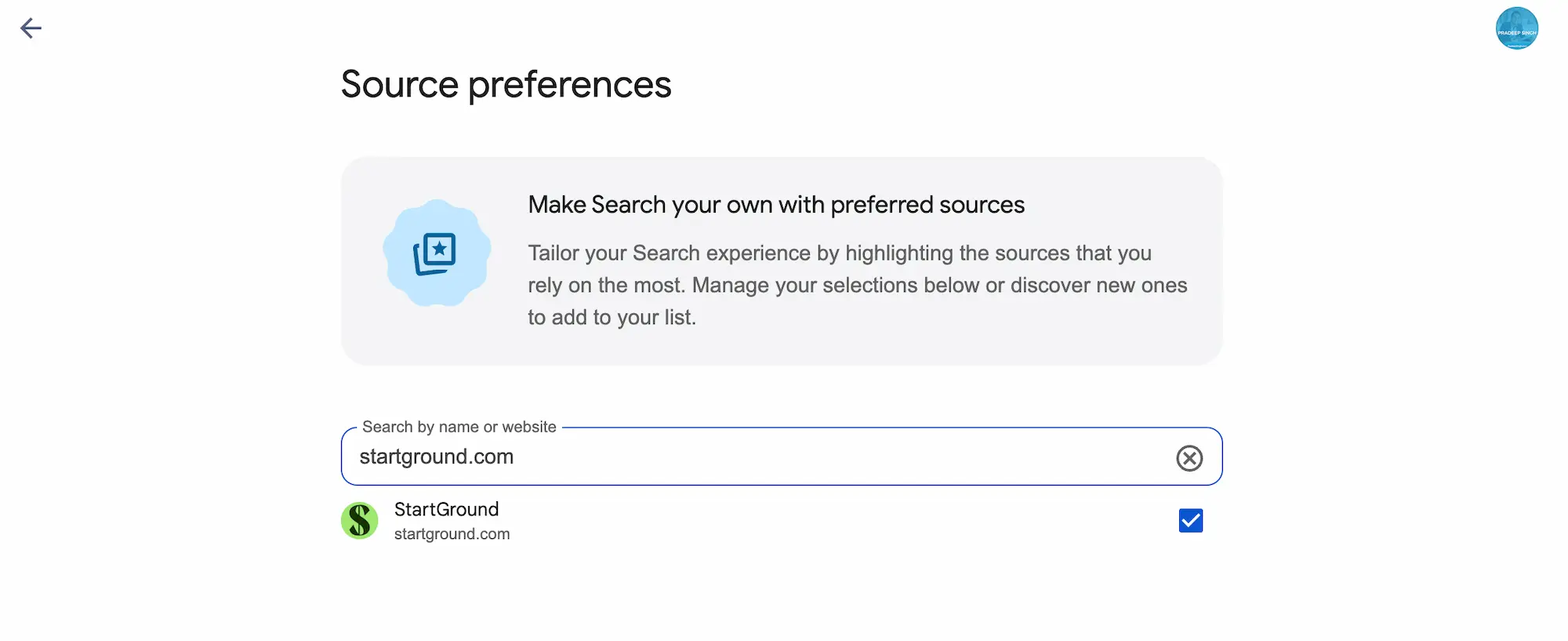
Step 2: Sign in to your Google account: Preferred sources only work while you are signed in. If Google prompts you to log in, use the account you normally use to search.
Step 3: Tick the box next to StartGround: Find startground.com in the results list and check the box beside it. The star confirms your selection.
That is the entire process. StartGround now appears prominently whenever you search for software deals, startup offers, or tools we cover.
What Are Google Preferred Sources?
Preferred Sources is a Google Search feature that lets you star the publishers you trust. Once you select a source, Google shows its content more prominently for relevant queries in three places:
| Where it appears | What you see |
|---|---|
| Top Stories | Articles from your preferred sources rank higher for relevant searches |
| From your sources | A dedicated section in results populated only by publishers you selected |
| AI Mode and AI Overviews | Your preferred sources carry a badge, so you can spot trusted links inside AI answers |
Google rolled the feature out globally in every language where Search operates, and the company’s own data shows people engage far more with sources they have starred. You stay in full control: add as many sources as you like and remove any of them from the same settings page at any time.
The feature personalises your results without narrowing them. You still see content from across the web. Your preferred sources simply surface first when they have something relevant to show.
Why Add StartGround as a Preferred Source?
Search for “[software name] promo code” or “[tool] discount” and you will find pages of results from coupon sites you have never heard of. Most of these pages are auto-generated. They list codes that expired years ago, codes that never existed, or “deals” that redirect you through affiliate links with no actual discount attached. You waste time testing dead codes at checkout and often end up paying full price anyway.
StartGround works differently. All software deals on our platform comes from a direct partnership with the software company itself. We verify each offer, publish the genuine terms, and remove deals when they end.
Adding StartGround as your preferred source turns Google into a quick verification tool:
Genuine deals surface first: When a real StartGround partner offer exists for a tool you search, it appears at the top of your results instead of buried under coupon spam.
Instant deal verification: If you search for a deal and nothing from StartGround appears, that is a strong signal no verified offer currently exists for that product. You can stop hunting through dead coupon pages.
A trust badge inside AI answers: When Google’s AI Mode or AI Overviews cite sources, StartGround links carry your preferred source badge, so you know which results come from a platform you chose to trust.
Never miss a new offer: New StartGround deals for popular software appear in your Top Stories and “From your sources” sections as we publish them.
How to Use This for Startups Deal Verification
Once StartGround sits in your preferred sources, your deal-hunting workflow becomes simple.
Search Google for the software you want, plus a word like “deal,” “promo code,” or “discount.” Three outcomes tell you everything you need to know:
A StartGround result appears at the top: A verified partner offer exists. Click through to our deal page, follow the claim steps, and the genuine discount applies through our partner link.
StartGround appears with general coverage but no deal page: We cover the tool, but no active partner offer runs right now. Check back, because new deals launch regularly, or browse the related category on StartGround for verified alternatives.
No StartGround result appears: Treat every coupon site in your results with caution. The codes you find on random aggregators are unverified, and most lead nowhere. You will save time by checking the StartGround deals library directly before testing codes at a checkout.
This approach flips the usual coupon hunt on its head. Instead of testing ten dead codes hoping one works, you check one trusted signal first.
Managing Your Preferred Sources
You stay in control of your selections at all times. Open the Google source preferences page from any search by clicking the star icon next to Top Stories, and you can add new publishers, remove existing ones, or review your full list. Changes apply instantly across desktop and mobile as long as you use the same Google account.
Preferred sources do not block other publishers. Google continues showing results from across the web. Your starred sources simply earn priority placement when their content matches your search.
Preferred Sources FAQs
Set It Up Now and Never Chase a Dead Coupon Again
One minute of setup ends the cycle of testing expired codes from anonymous coupon sites. Add StartGround as your preferred source and Google itself becomes your verification layer for genuine software deals.
If you regularly search for SaaS discounts: Set this up now so verified StartGround offers reach you before the coupon spam does.
If you have ever pasted a dead promo code at checkout: This is the fix. A missing StartGround result tells you instantly when no genuine deal exists.
If you run a startup and buy software often: Pair this with your free StartGround membership, and you will catch every new partner deal as it launches.
Use the direct setup link, tick one box, and every future search works harder for you.

