
EmDash CMS by Cloudflare is one of the most ambitious open-source launches in years, aiming to challenge WordPress’s dominance.
Cloudflare built it from the ground up as a serverless TypeScript CMS designed to take over where WordPress leaves off — with sandboxed plugins, structured content, and AI agents treated as first-class users.
But ambition and execution are two different things. You need to know whether EmDash is ready for your next project, what it gets right, where it falls short, and who should actually consider using it today.
This review covers everything from the initial deployment experience through daily content management, plugin architecture, developer tooling, performance characteristics, and long-term viability.
StartGround members can access EmDash deal through the exclusive Cloudflare partner deal inside the community — making it a zero-risk platform to evaluate for yourself.
What Is EmDash?
EmDash is an open-source, full-stack content management system written entirely in TypeScript. It runs on the Astro web framework and deploys natively to Cloudflare’s serverless infrastructure (Workers, D1, R2), though you can also run it on any Node.js server with SQLite.

Cloudflare positions it as the spiritual successor to WordPress — a CMS that retains the familiar admin experience, plugin ecosystem, and content management workflow, but replaces the 24-year-old PHP foundation with a modern serverless architecture.
The project uses the MIT license, a deliberate departure from WordPress’s GPL licensing. Cloudflare released EmDash at version 0.1.0 as an early developer preview.
Matt Kane, one of the lead engineers and a member of the Astro core team, emphasised that despite heavy use of AI coding agents during development, EmDash is not a vibe-coded weekend experiment — it represents two months of focused engineering built on top of the Astro framework that Cloudflare acquired in January 2026.
The v0.1.0 label matters. EmDash is real software with real capabilities, but it is explicitly pre-production. Your evaluation should account for that.
EmDash First Impressions and Setup Experience
Deploying to Cloudflare
The deployment process is remarkably smooth for a CMS. You can deploy EmDash directly from the Cloudflare dashboard by selecting the EmDash template under Workers & Pages.
The setup asks you to connect a Git account, name your project, and configure a D1 database and R2 bucket. Cloudflare creates both resources automatically if you do not have them.
The entire process takes a few clicks and a couple of minutes — a far cry from the VPS provisioning, PHP configuration, and database creation that a traditional WordPress deployment demands.
StartGround members can cover all of these costs through the exclusive Cloudflare partner offer inside the community, which provides 1 year of free credits worth up to $250,000.
The Initial Setup Flow
Once deployed, EmDash walks you through a three-step initial setup. You create your admin account using a passkey (no passwords by default), set your site name, and land in the admin panel.
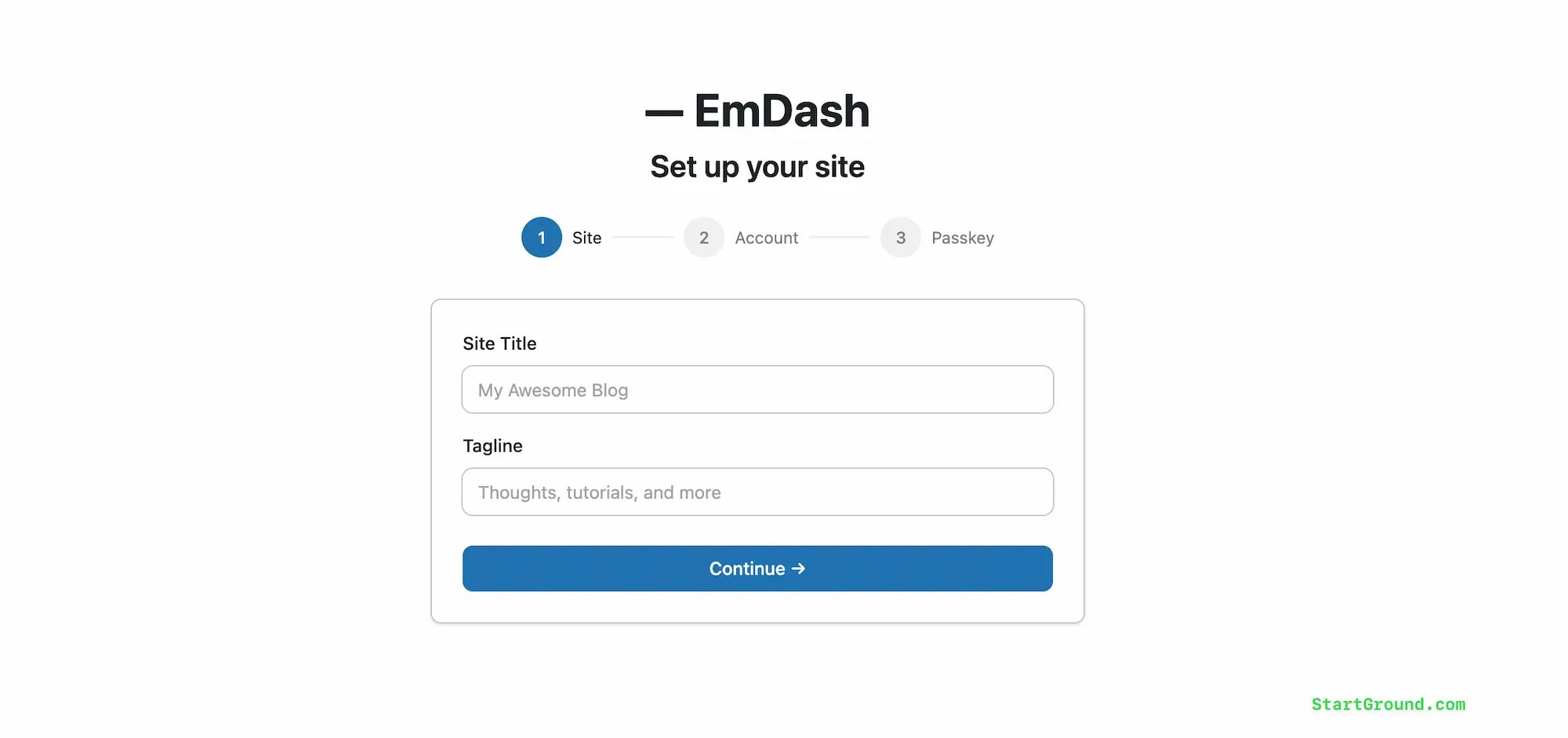
The experience feels intentional and polished for a beta product. If you have ever set up a WordPress site, you will recognise the admin panel layout immediately — the left sidebar lists Pages, Posts, Media, Comments, Menus, Redirects, Widgets, Sections, Categories, Tags, Bylines, Content Types, and Users.
That familiarity is a design choice, not an accident. Cloudflare specifically modelled the admin interface to reduce friction for WordPress users evaluating EmDash.
Running EmDash Locally
You can also run EmDash entirely on your local machine using Node.js and SQLite. The CLI command npm create emdash@latest scaffolds a new project, and pnpm dev starts a local development server.
The admin panel opens at localhost:4321/_emdash/admin. Local development requires no Cloudflare account, no credit card, and no internet connection after the initial package install. This makes it easy to evaluate EmDash before committing to any infrastructure.
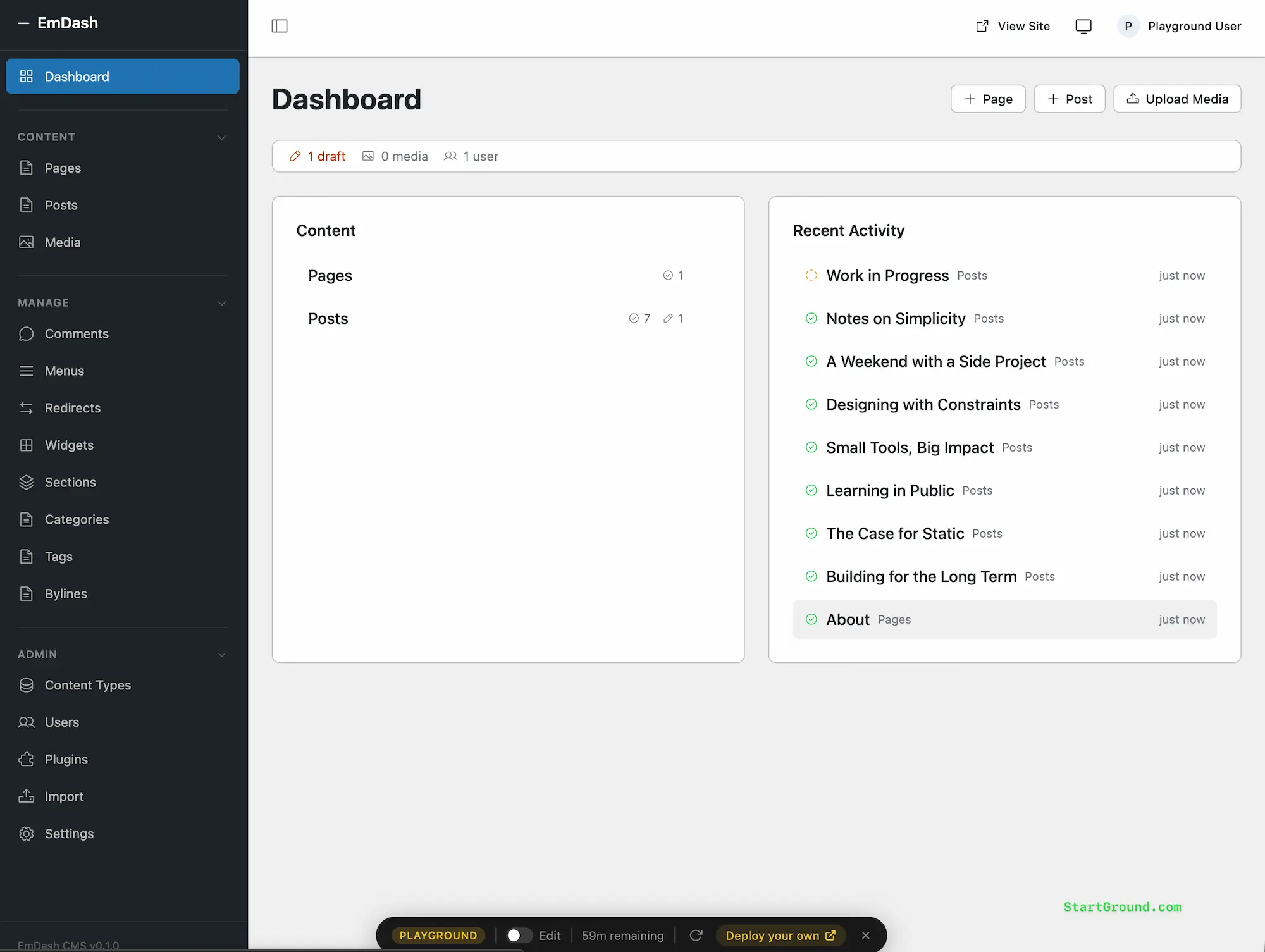
EmDash Content Editing Experience
The Rich Text Editor
EmDash uses a TipTap-based rich text editor that covers the core editing features: bold, italic, headings, lists, blockquotes, and image insertion. It is functional and clean.
If you have used WordPress before the Gutenberg block editor era, the editing experience will feel immediately familiar — a straightforward writing environment without the complexity of dragging blocks around.
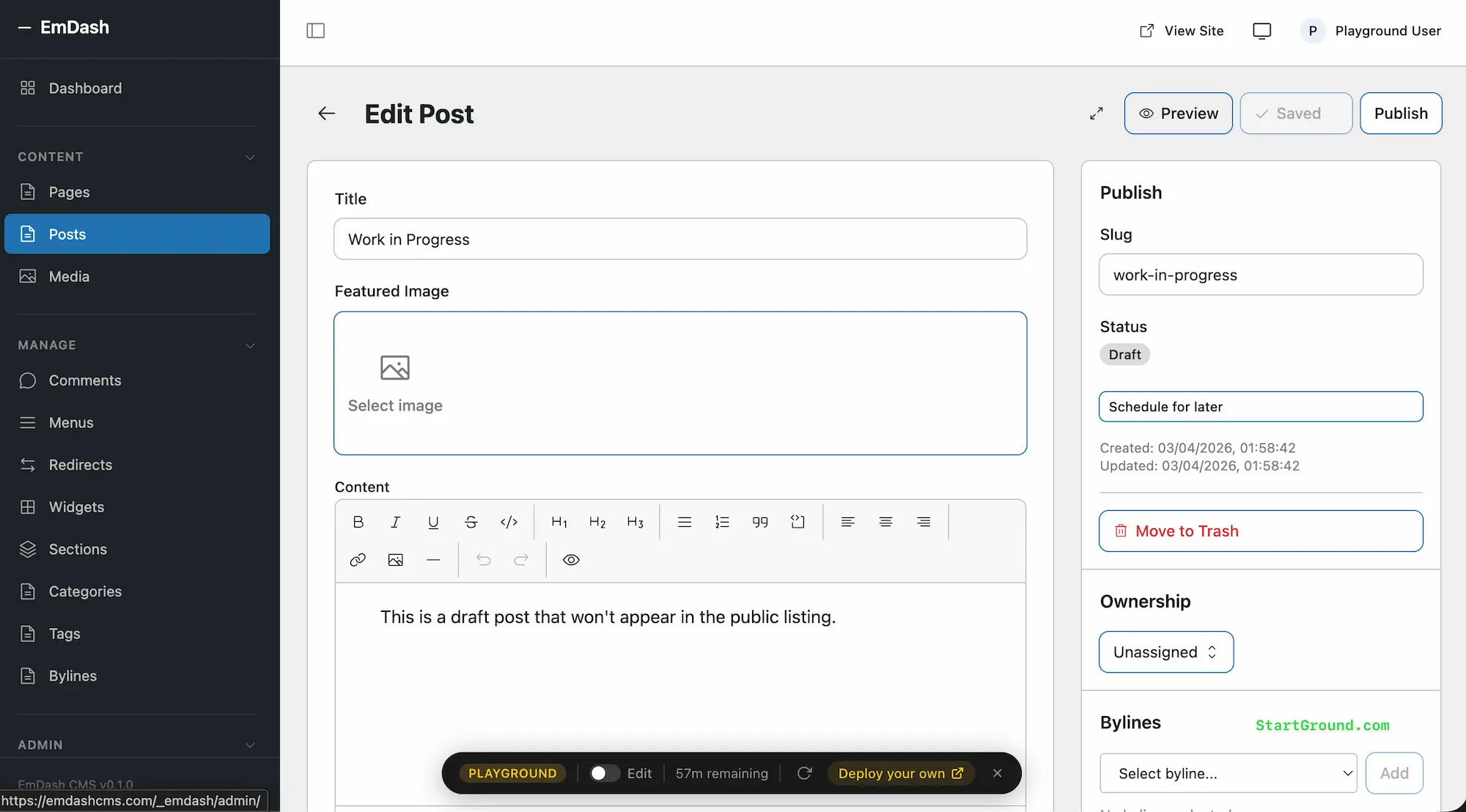
That said, it is deliberately simpler than what WordPress offers today. There is no block editor, no drag-and-drop page builder, no visual component assembly. You write content, format it, insert media, and publish.
For blog posts, documentation, and standard content pages, this is perfectly adequate. For landing pages with complex layouts, marketing microsites, or visually rich portfolio presentations, you will need to handle the layout in your Astro theme code rather than in the editor.
One developer reviewer noted that dropping a block editor entirely might be a step backward. The question was raised directly: is the future really Astro plus a traditional rich text editor?
For founders who just need to publish and manage content quickly, the simplicity is a strength. For those accustomed to WordPress’s Full Site Editing or visual page builders like Elementor, EmDash’s editor will feel limited.
Portable Text Storage
Behind the scenes, EmDash stores all content as Portable Text — structured JSON rather than raw HTML. You never see this as a content editor, but it fundamentally changes what your content can do. A blog post stored as Portable Text can render as a web page, a mobile app screen, an email, or an API response without any HTML parsing or transformation. Your content exists independently of its visual presentation.
This is a significant architectural advantage over WordPress, where content is stored as serialised HTML with metadata embedded in HTML comments. If you plan to repurpose content across multiple channels — a website, a newsletter, a mobile app, an API for third-party consumers — Portable Text gives you that flexibility from day one.
Custom Content Types
Creating custom content types in WordPress typically requires installing a plugin like Advanced Custom Fields and squeezing the result into the existing posts table. EmDash handles this natively in the admin panel. You define a schema through the visual schema builder, and EmDash creates an entirely new database collection with its own typed columns. Each content type gets its own SQL table — clean, organised, and queryable.
You can generate TypeScript types from your live schema using npx emdash types, which means your frontend code gets full type safety against your content structure. For developer-founders who want their CMS schema and application code to stay in sync, this workflow is elegant.
EmDash Plugins Architecture
How Plugin Sandboxing Works
Every review of EmDash leads with plugin security, and for good reason — it is the core innovation that justifies the entire project. WordPress plugins run as PHP scripts with full access to the site’s database, filesystem, and user data. A single vulnerable plugin can compromise everything. Cloudflare cites the statistic that 96% of WordPress security vulnerabilities originate in plugins, and 2025 saw more high-severity WordPress vulnerabilities than the two previous years combined.
EmDash takes a fundamentally different approach. Each plugin runs inside its own isolated Dynamic Worker — a sandboxed V8 isolate on Cloudflare’s infrastructure. Every plugin must declare a capability manifest specifying exactly what permissions it needs. A plugin requesting read:content and email:send can do exactly those two things and nothing else. It cannot access the filesystem, cannot make arbitrary network calls, and cannot read other plugins’ data. You see the full permission set before installation, similar to reviewing OAuth scopes for a third-party application.
The plugin’s admin UI is also sandboxed. Plugin interfaces render through a JSON schema similar to Slack’s Block Kit — plugins cannot inject arbitrary HTML or JavaScript into the admin panel. This is security by architecture, not by trust.
The Marketplace Implications
The sandboxing model changes more than just security. It changes the entire marketplace dynamic. WordPress plugins must pass through a manual review queue on WordPress.org (currently over 800 plugins deep with a two-week wait), partly because the security risk of unvetted plugins is so high.
The GPL licensing requirement for WordPress plugins creates additional friction — plugin developers must give away their source code, effectively locking them into the marketplace as their primary distribution channel.
EmDash plugins can carry any license the developer chooses, because they run independently in a sandbox and share no code with EmDash itself. The security guarantees come from the architectural isolation, not from marketplace gatekeeping.
A site administrator can evaluate a plugin based on its declared permissions rather than relying on ratings and reputation. This opens the door for a more decentralised plugin ecosystem — though that ecosystem needs to actually materialise, which is the main challenge EmDash faces today.
The Cloudflare Dependency
Here is the honest caveat: plugin sandboxing via Dynamic Workers only functions on Cloudflare’s infrastructure. If you self-host EmDash on a standard Node.js server, plugins run in-process without isolation — you lose the security model entirely.
This means the headline feature that differentiates EmDash from every other CMS only works on one platform.
For founders using the StartGround Cloudflare deal, this is not a practical limitation — you are already deploying to Cloudflare. For those who need full platform portability, it is a significant consideration. EmDash is technically not locked to Cloudflare, but its most important differentiator is.
EmDash Developer Experience
TypeScript Throughout
EmDash is end-to-end TypeScript. Your themes, your plugins, your content queries, your configuration — everything uses a single language with full type safety.
If you are a TypeScript developer already working in the Astro ecosystem, the onboarding experience is genuinely fast. You create Astro pages, layouts, and components using the same patterns and tooling you already know.
The codebase uses Kysely for SQL queries (providing type-safe database access across SQLite, D1, Turso, and PostgreSQL) and the S3 API for storage (working with R2, AWS S3, or local files).
These portable abstractions mean your code is not tightly coupled to Cloudflare, even if the plugin sandboxing is.
AI-Native Development Workflow
This is where EmDash does something no other CMS has attempted at this depth. The entire architecture assumes AI coding agents are legitimate users of the system. EmDash ships with Agent Skills — structured documentation that describes the platform’s capabilities, hooks, and plugin patterns in a format optimised for AI consumption.
The CLI outputs JSON, making it parseable by agents. Every EmDash instance includes a built-in MCP (Model Context Protocol) server that lets AI tools like Claude or Cursor create content types, manage entries, configure plugins, and deploy changes programmatically.
Joost de Valk, the creator of Yoast SEO and one of the most respected voices in the WordPress ecosystem, described EmDash as agent-native rather than agent-compatible. He spent an evening building an EmDash theme and migrating his blog content because the AI development workflow felt that natural.
That endorsement carries weight — when the person who built WordPress’s most widely used SEO plugin takes a new CMS seriously, the underlying architecture has substance.
Several reviewers independently highlighted the MCP server integration as the feature that puts EmDash ahead of anything WordPress offers natively for AI-assisted workflows. Whether this matters to you depends entirely on whether you use AI coding agents in your development process. If you do, EmDash is built for how you work. If you do not, it is a feature you may never touch.
EmDash Themes Model
EmDash themes are standard Astro projects. You build pages, layouts, and components, add styles (CSS or Tailwind), and include a seed.json file that tells the CMS what content types and fields to create when the theme installs.
Themes cannot perform database operations — they only render content. This eliminates the security risks that WordPress themes carry through functions.php.
The theming model will feel familiar to anyone who built WordPress themes before Full Site Editing. Template files, content loops, straightforward rendering. EmDash ships with three starter templates — Blog, Marketing, and Portfolio — that demonstrate common patterns. Creating a custom theme from scratch takes a few hours for an experienced Astro developer.
The limitation: there is no visual theme customiser, no point-and-click site builder, no way for a non-developer to change layouts or styling through the admin panel. Theme customisation requires code changes. For developer-founders, this is fine. For non-technical founders who want to adjust their site’s appearance without touching code, it is a dealbreaker in its current form.
EmDash Performance and Hosting
Serverless Scale-to-Zero
On Cloudflare, EmDash scales to zero. When nobody visits your site, you pay nothing beyond the Workers Paid base fee ($5/month, covered by the StartGround deal). When a request arrives, Cloudflare spins up a V8 isolate in milliseconds, serves the response, and scales back down. You pay only for CPU time spent processing requests — no idle compute, no pre-provisioned servers, no capacity planning.
Cloudflare’s free tier provides 100,000 requests per day, which handles many small sites comfortably. The Workers Paid plan includes 10 million requests per month. For most startup websites, the StartGround credits will cover your entire first year of operation without any infrastructure cost.
Edge Distribution
EmDash renders content at the edge closest to each visitor, across Cloudflare’s 300+ data centres worldwide. Page loads benefit from minimal latency regardless of where your audience sits. Astro’s default behaviour of shipping zero client-side JavaScript (unless you explicitly opt into interactive islands) means pages are lightweight and fast by default.
Database Considerations
EmDash uses D1 (Cloudflare’s serverless SQLite database) in production. For sites with a few hundred pages, this works well. One hands-on reviewer flagged that sites with thousands of pages might require additional caching layers (such as KV caching) to maintain performance, given D1’s SQLite foundation. This is a reasonable observation for high-volume content sites, though most startup websites and blogs will never hit this threshold.
WordPress to EmDash Migration
EmDash includes built-in migration tools that import posts, pages, media, taxonomies, and custom post types from WordPress. You can migrate by exporting a WXR file from WordPress admin, or by installing the EmDash Exporter plugin on your WordPress site to create a secure export endpoint.
The content migration is functional and brings attached media into EmDash’s media library automatically. Custom post types from WordPress map to native EmDash collections with their own database tables.
What does not migrate: your WordPress theme, your plugins, your custom PHP logic, your WooCommerce store, your membership system, or any functionality that relies on the WordPress PHP ecosystem. The migration tool imports content. Everything else requires rebuilding — either manually, with an AI agent using EmDash’s Agent Skills, or from scratch.
For sites where the content is the primary asset and the frontend is being rebuilt anyway, this works well. For complex WordPress installations with dozens of active plugins and deeply customised themes, the migration represents a ground-up rebuild of everything except the content itself.
Who Should Use EmDash Today?
Strong Fit
Developer-founders starting new projects. If you are launching a new blog, content site, documentation hub, or marketing site and you are comfortable with TypeScript and terminal commands, EmDash offers a genuinely modern foundation. The StartGround Cloudflare deal eliminates hosting costs for a full year, making the risk minimal.
Teams already invested in the Cloudflare ecosystem. If your infrastructure already runs on Cloudflare Workers, your storage lives in R2, and your team writes TypeScript, EmDash slots in naturally. The plugin sandboxing works fully, and the serverless deployment model matches what you are already doing.
AI-forward development teams. If your workflow involves AI coding agents for building and maintaining your site, EmDash’s MCP server, Agent Skills, and JSON CLI give your agents direct, structured access to your CMS. No other platform offers this depth of AI integration today.
Not Ready Yet For
Non-technical founders who need a visual site builder. EmDash has no drag-and-drop page builder, no visual theme customiser, and requires terminal usage for setup and theme changes. If you want a WordPress or Wix-like experience of clicking together a website, EmDash is not there yet.
E-commerce sites or complex application platforms. There is no WooCommerce equivalent, no membership plugin, no mature form builder, and no ecosystem of ready-made solutions for common business needs. The plugin marketplace exists architecturally but has almost no third-party plugins.
Sites that need platform independence from day one. The sandboxed plugin system — EmDash’s primary differentiator — only works on Cloudflare. Self-hosting gives you a CMS without its headline security feature. If you need full platform portability with no compromises, EmDash creates an uncomfortable trade-off.
The EmDash Ecosystem Question
History shows that CMS adoption depends more on available plugins and themes than on technical merit. Ghost, Craft, and Statamic all launched with excellent architecture and strong developer experience. None built the broad ecosystem needed for mainstream adoption.
WordPress has over 60,000 plugins and thousands of themes built over two decades. EmDash has a handful of first-party plugins (forms, embeds, SEO, audit-log, Bluesky integration) and three starter templates.
The EmDash plugin marketplace exists as an API-only service with automated security scanning via Workers AI. Submissions go through content classification using Llama Guards. The infrastructure for an ecosystem is in place. The community that fills it does not exist yet.
Whether EmDash attracts a critical mass of plugin and theme developers will determine its long-term viability. The MIT license, sandboxed architecture, and flexible licensing model for plugins create a more developer-friendly ecosystem than WordPress’s GPL-driven marketplace. But potential alone does not ship plugins.
The chicken-and-egg problem is real, and EmDash will need to solve it the same way every successful platform has — by delivering enough built-in value that early adopters show up and start building.
How EmDash Compares
| Dimension | EmDash | WordPress | Ghost | Strapi |
|---|---|---|---|---|
| Core Language | TypeScript | PHP | Node.js | Node.js |
| Hosting Model | Serverless (Cloudflare) | Traditional server | Traditional server | Traditional server |
| Plugin Security | Sandboxed isolates | Full system access | Limited plugin model | Plugin-based |
| Content Storage | Portable Text (JSON) | Serialised HTML | Mobiledoc | JSON |
| Visual Site Builder | No | Yes (Gutenberg, Elementor) | Limited | No |
| Plugin Ecosystem | Nearly empty | 60,000+ plugins | Small | Growing |
| AI Integration | MCP server, CLI, Agent Skills | Bolt-on only | None | None |
| License | MIT | GPL | MIT | MIT |
| Authentication | Passkeys (default) | Username/password | Email-based | Token-based |
| Custom Content Types | Native (own DB tables) | Via plugins (shared table) | Limited | Native |
| Maturity | Beta (v0.1.0) | Stable (24 years) | Stable | Stable |
Our Bottom Line on EmDash
EmDash is the most architecturally interesting CMS to launch in years. The plugin sandboxing model addresses a genuine, long-standing security crisis in the CMS world.
The AI-native design philosophy is not a marketing add-on — it is woven into every layer of the platform. The TypeScript-first, Astro-powered frontend theming model produces fast, secure sites with a developer experience that feels right for 2026.
It is also a v0.1.0 beta with no ecosystem, no visual site builder, and a headline feature that requires Cloudflare to function fully. Those are not disqualifying facts — they are early-stage realities. Every CMS that eventually succeeded started somewhere similar.
EmDash

EmDash is an open-source serverless CMS built on TypeScript and the Astro framework, designed for developers and founders who want sandboxed plugin security, structured content storage, and AI-native site management on Cloudflare's edge network.
Price Currency: USD
Application Category: DeveloperApplication
4
Pros
- Plugin sandboxing eliminates CMS security risks.
- AI-native MCP server and agent tooling.
- MIT-licensed with full TypeScript stack.
Cons
- No visual site builder or page editor.
- Plugin ecosystem is nearly empty at launch.
- Sandboxing requires Cloudflare infrastructure.
For startup founders and developers willing to build on a new foundation — particularly those who can take advantage of the StartGround Cloudflare deal to eliminate hosting costs for a full year — EmDash is worth serious evaluation.
You get a modern CMS with the right architecture, backed by Cloudflare’s infrastructure, at zero cost during the period when your site needs it most.
Head to the StartGround community through the partner link, activate your Cloudflare credits, and deploy EmDash to see whether it fits your workflow. The investment is time, not money — and the architecture is strong enough to reward that time.

